

Show Task
Show Task in “repcli”
To view the task configuration details use “compare show” command:
repcli compare show capture=capture_id taskname=task_nameThe parameters are:
- capture - ID of the Capture Process
- taskname - Name of the task
The command output provides details on the configured tables and the validation rules.
Example
Run the following command to show the “default” task configuration:
repcli compare show capture=2 taskname=defaultThe command output:
                                                                                               TASK NAME: default
                                                                       -------------------------------------------


  | Table Name                                       |  Deep|     Chunk|                                 Where
------------------------------------------------------------------------------------------------------------------
- | dbo.FactFinance                                  |    10|    100000|
   |  No primary key or unique index. Skipped.
------------------------------------------------------------------------------------------------------------------
+ | dbo.DimAccount                                   |   100|     10000|
   |  [ValueType] -> upper(ValueType)
   |  [AccountType] -> upper(AccountType)
   |  [Operator] -> upper(Operator)
   |  [AccountDescription] -> upper(AccountDescription)
   |  [CustomMembers] -> upper(CustomMembers)
   |  [CustomMemberOptions] -> upper(CustomMemberOptions)
------------------------------------------------------------------------------------------------------------------
+ | dbo.DimCurrency                                  |   100|     10000|
   |  [CurrencyName] -> upper(CurrencyName)
------------------------------------------------------------------------------------------------------------------
+ | dbo.DimCustomer                                  |   100|     10000|
------------------------------------------------------------------------------------------------------------------
+ | dbo.DimDate                                      |   100|     10000|
   |  [FrenchDayNameOfWeek] -> upper(FrenchDayNameOfWeek)
   |  [SpanishDayNameOfWeek] -> upper(SpanishDayNameOfWeek)
   |  [EnglishMonthName] -> upper(EnglishMonthName)
   |  [FrenchMonthName] -> upper(FrenchMonthName)
   |  [EnglishDayNameOfWeek] -> upper(EnglishDayNameOfWeek)
   |  [SpanishMonthName] -> upper(SpanishMonthName)
------------------------------------------------------------------------------------------------------------------
+ | dbo.DimDepartmentGroup                           |   100|     10000|
   |  [DepartmentGroupName] -> upper(DepartmentGroupName)
------------------------------------------------------------------------------------------------------------------
+ | dbo.DimGeography                                 |   100|     10000|
   |  [IpAddressLocator] -> upper(IpAddressLocator)
   |  [EnglishCountryRegionName] -> upper(EnglishCountryRegionName)
   |  [City] -> upper(City)
   |  [PostalCode] -> upper(PostalCode)
   |  [SpanishCountryRegionName] -> upper(SpanishCountryRegionName)
   |  [FrenchCountryRegionName] -> upper(FrenchCountryRegionName)
   |  [StateProvinceName] -> upper(StateProvinceName)
   |  [CountryRegionCode] -> upper(CountryRegionCode)
   |  [StateProvinceCode] -> upper(StateProvinceCode)
------------------------------------------------------------------------------------------------------------------
+ | dbo.DimOrganization                              |   100|     10000|
   |  [PercentageOfOwnership] -> upper(PercentageOfOwnership)
   |  [OrganizationName] -> upper(OrganizationName)
------------------------------------------------------------------------------------------------------------------
+ | dbo.DimProduct                                   |   100|     10000|
   |  [ThaiDescription] -> upper(ThaiDescription)
   |  [JapaneseDescription] -> upper(JapaneseDescription)
   |  [Color] -> upper(Color)
   |  [Status] -> upper(Status)
   |  [HebrewDescription] -> upper(HebrewDescription)
   |  [EnglishDescription] -> upper(EnglishDescription)
   |  [Size] -> upper(Size)
   |  [GermanDescription] -> upper(GermanDescription)
   |  [SizeRange] -> upper(SizeRange)
   |  [TurkishDescription] -> upper(TurkishDescription)
   |  [ModelName] -> upper(ModelName)
   |  [EnglishProductName] -> upper(EnglishProductName)
   |  [ProductAlternateKey] -> upper(ProductAlternateKey)
   |  [ChineseDescription] -> upper(ChineseDescription)
   |  [FrenchProductName] -> upper(FrenchProductName)
   |  [FrenchDescription] -> upper(FrenchDescription)
   |  [ArabicDescription] -> upper(ArabicDescription)
   |  [SpanishProductName] -> upper(SpanishProductName)
------------------------------------------------------------------------------------------------------------------
+ | dbo.DimProductCategory                           |   100|     10000|
   |  [FrenchProductCategoryName] -> upper(FrenchProductCategoryName)
   |  [EnglishProductCategoryName] -> upper(EnglishProductCategoryName)
   |  [SpanishProductCategoryName] -> upper(SpanishProductCategoryName)
------------------------------------------------------------------------------------------------------------------
+ | dbo.DimProductSubcategory                        |   100|     10000|
   |  [EnglishProductSubcategoryName] -> upper(EnglishProductSubcategoryName)
   |  [SpanishProductSubcategoryName] -> upper(SpanishProductSubcategoryName)
   |  [FrenchProductSubcategoryName] -> upper(FrenchProductSubcategoryName)
------------------------------------------------------------------------------------------------------------------
+ | dbo.DimPromotion                                 |   100|     10000|
   |  [FrenchPromotionName] -> upper(FrenchPromotionName)
   |  [EnglishPromotionType] -> upper(EnglishPromotionType)
   |  [FrenchPromotionType] -> upper(FrenchPromotionType)
   |  [EnglishPromotionName] -> upper(EnglishPromotionName)
   |  [FrenchPromotionCategory] -> upper(FrenchPromotionCategory)
   |  [SpanishPromotionName] -> upper(SpanishPromotionName)
   |  [EnglishPromotionCategory] -> upper(EnglishPromotionCategory)
   |  [SpanishPromotionCategory] -> upper(SpanishPromotionCategory)
   |  [SpanishPromotionType] -> upper(SpanishPromotionType)
------------------------------------------------------------------------------------------------------------------
+ | dbo.DimReseller                                  |   100|     10000|
   |  [BankName] -> upper(BankName)
   |  [AddressLine2] -> upper(AddressLine2)
   |  [ResellerName] -> upper(ResellerName)
   |  [AddressLine1] -> upper(AddressLine1)
   |  [Phone] -> upper(Phone)
   |  [ProductLine] -> upper(ProductLine)
   |  [ResellerAlternateKey] -> upper(ResellerAlternateKey)
------------------------------------------------------------------------------------------------------------------
+ | dbo.DimSalesReason                               |   100|     10000|
   |  [SalesReasonName] -> upper(SalesReasonName)
   |  [SalesReasonReasonType] -> upper(SalesReasonReasonType)
------------------------------------------------------------------------------------------------------------------
+ | dbo.DimSalesTerritory                            |   100|     10000|
   |  [SalesTerritoryGroup] -> upper(SalesTerritoryGroup)
   |  [SalesTerritoryRegion] -> upper(SalesTerritoryRegion)
   |  [SalesTerritoryCountry] -> upper(SalesTerritoryCountry)
------------------------------------------------------------------------------------------------------------------
+ | dbo.DimScenario                                  |   100|     10000|
   |  [ScenarioName] -> lower(ScenarioName)
------------------------------------------------------------------------------------------------------------------
+ | dbo.FactCallCenter                               |    10|    100000|
------------------------------------------------------------------------------------------------------------------
+ | dbo.FactCurrencyRate                             |    10|    100000|
------------------------------------------------------------------------------------------------------------------
+ | dbo.FactInternetSales                            |   100|    100000|
------------------------------------------------------------------------------------------------------------------
+ | dbo.FactProductInventory                         |    10|    100000|
------------------------------------------------------------------------------------------------------------------
+ | dbo.FactResellerSales                            |    10|    100000|
------------------------------------------------------------------------------------------------------------------
+ | dbo.FactSalesQuota                               |    10|    100000|
------------------------------------------------------------------------------------------------------------------
+ | dbo.FactSurveyResponse                           |    10|    100000|
------------------------------------------------------------------------------------------------------------------
REST API
- Endpoint: https://repstance_url/compare/show
- Method: POST
- Header:
- Content-Type: application/json
- X-Token: token
- Body:
{
"capture_id":id_of_the_capture_process,
"name":"name_of_the_task"
}
Web UI
To view the task configuration in the Web UI open the “Compare” window of the Capture Process (click “Compare” on the card of the Capture Process), select the tab of the task and click “Edit”:
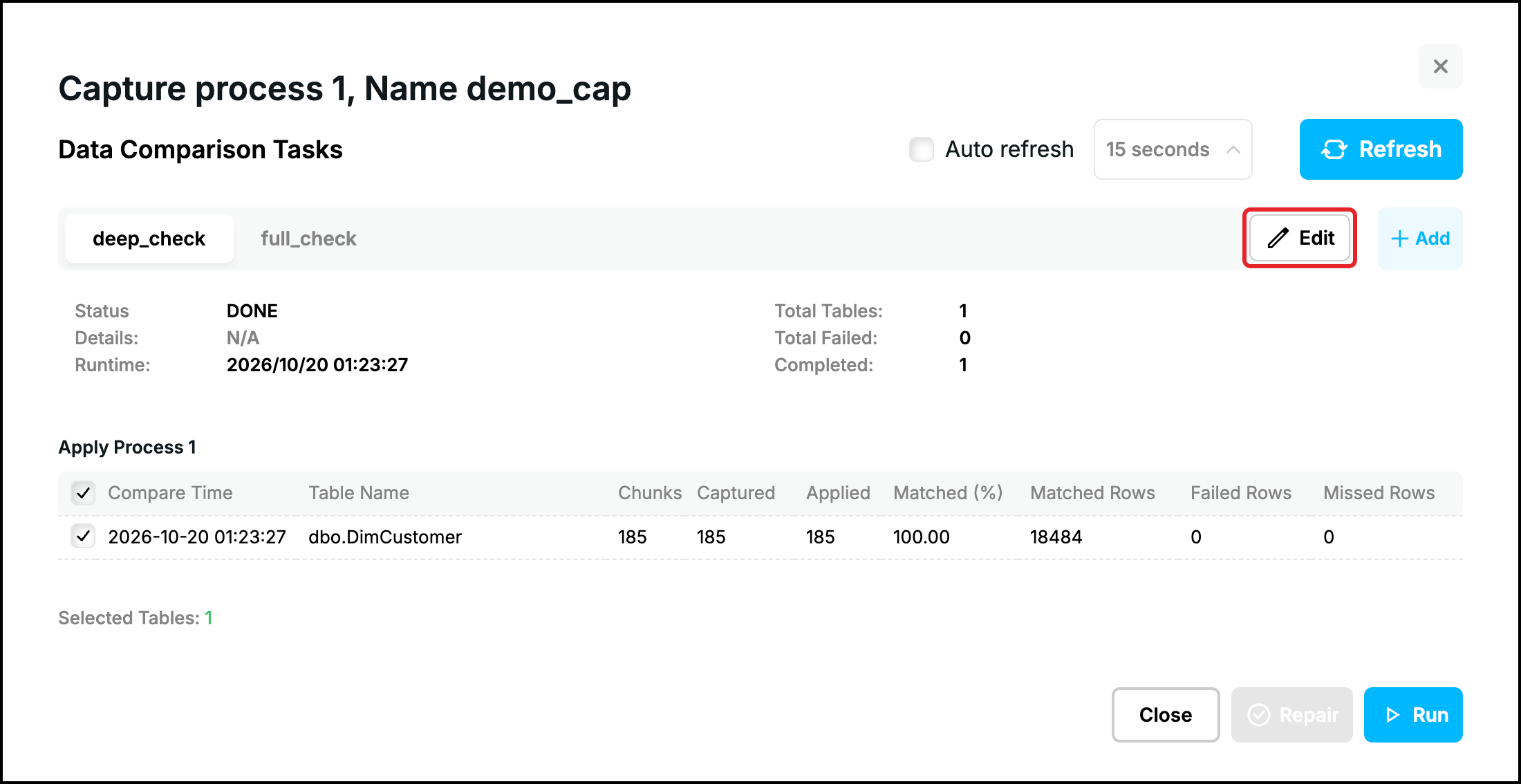
The window of the task opens with its saved settings: the tables of the task with their validation percentage and chunk size, and under the arrow of a table its columns with the excluded columns, the key and the functions. See Task Configuration for the description of the settings and for changing the task.
Prev page:
Start/Stop TaskNext page:
List of the Tasks- Repstance User Guide
- ABOUT REPSTANCE
- SUPPORTED DATABASE REQUIREMENTS
- GETTING STARTED WITH REPSTANCE
- INTERACTING WITH REPSTANCE SERVER
- CONFIGURE REPLICATION WITH REPSTANCE
- DATABASE CONFIGURATION COMMANDS
- PROCESS CONFIGURATION COMMANDS
- PROCESS CONTROL COMMANDS
- REPSTANCE WEB USER INTERFACE
- REPSTANCE SERVER MAINTENANCE
- MONITORING WITH AMAZON CLOUDWATCH
- MONITORING WITH AZURE MONITOR
- TROUBLESHOOTING AND FAQ
- GLOSSARY