

AWS S3 as Target
Note – AWS S3 is supported as a Target by Repstance Advanced Edition only (see Supported Database Requirements).
With AWS S3 as the Target the Apply Process writes files to an S3 bucket. There is no database and there are no Repstance objects, so prepare and remove with dbtype=s3 do nothing: they are answered with the status In Process. Only validate works. It connects to AWS and lists the buckets of the account, which needs the permission s3:ListAllMyBuckets; it does not look at the bucket of the Apply Process. The permissions that the credentials need are described in Database Privileges.
Parameters
| Parameter | Description |
|---|---|
| database | target. Required. |
| dbtype | s3. Required. |
| s3.accesskeyid | The AWS access key ID. Without it the default credentials of the host are used, for example the IAM role of the instance. |
| s3.secretaccesskey | The AWS secret access key of the key ID (see Manage access keys for IAM users). It is not used without s3.accesskeyid. |
| s3.region | The AWS region, for example eu-west-1. The default is us-east-1. |
The bucket and the other S3 parameters belong to the Apply Process, see AWS S3 Apply Parameters.
Examples
Check the access to AWS. The credentials of the host do not allow it in this example:
repcli validate database=target dbtype=s3 s3.region=eu-west-1
[Invalid]: AccessDenied: User: arn:aws:sts::123456789012:assumed-role/RepstanceRole/i-0123456789abcdef0 is not authorized to perform: s3:ListAllMyBuckets because no identity-based policy allows the s3:ListAllMyBuckets action
        status code: 403, request id: 0A1B2C3D4E5F6A7B, host id: 0123456789abcdefghijklmnopqrstuvwxyzABCDEFGHIJKLMNOPQRSTUVWXYZ
prepare and remove do nothing:
repcli prepare database=target dbtype=s3 s3.region=eu-west-1
[In Process]: Command [PREPARE] has been sent. Use [validate] command to validate the state
Web UI
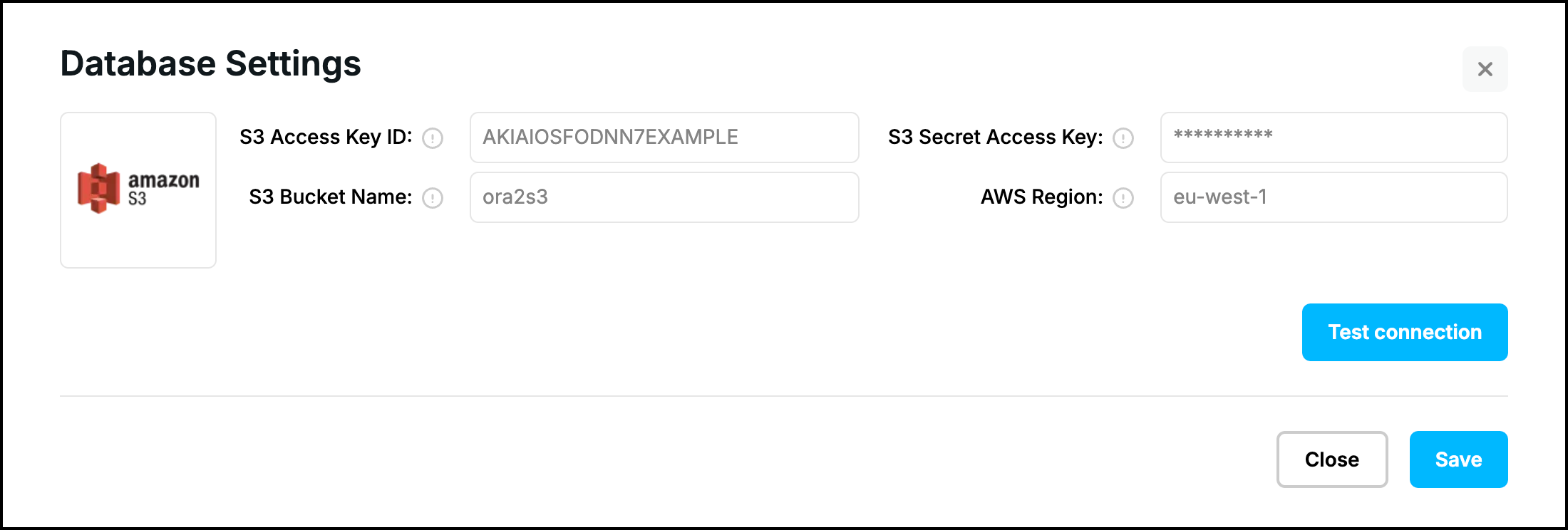
The form “Database Settings” of an Apply Process for AWS S3 has the fields “S3 Access Key ID”, “S3 Secret Access Key”, “S3 Bucket Name” and “AWS Region”. “Test connection” is validate. “S3 Bucket Name” is saved with the Apply Process (s3.bucketname, see AWS S3 Apply Parameters), the test does not use it. The form has no buttons to prepare the database or to clean it up:
Prev page:
Redshift as TargetNext page:
Kafka as Target- Repstance User Guide
- ABOUT REPSTANCE
- SUPPORTED DATABASE REQUIREMENTS
- GETTING STARTED WITH REPSTANCE
- INTERACTING WITH REPSTANCE SERVER
- CONFIGURE REPLICATION WITH REPSTANCE
- PROCESS CONFIGURATION COMMANDS
- PROCESS CONTROL COMMANDS
- DATA COMPARISON
- REPSTANCE WEB USER INTERFACE
- REPSTANCE SERVER MAINTENANCE
- MONITORING WITH AMAZON CLOUDWATCH
- MONITORING WITH AZURE MONITOR
- TROUBLESHOOTING AND FAQ
- GLOSSARY