

Azure Monitor Alerts
An alert rule runs a query on the workspace every few minutes. When the query finds the condition, an alert is fired; when the condition is gone, the alert is resolved. A rule can notify an action group. This page describes the rules of a replication, and the two rules that the template of Install the Monitoring Function creates.
How the rules look at the rows
Every rule looks at the newest rows that have reached the workspace, not at a time window: it fires when the newest 3 rows (the parameter pollsInAlarm) of the process are all bad. The rows reach the workspace a few seconds to several minutes after the function wrote them, so a rule that counted the rows of the last five minutes would see only some of them. A rule runs every 5 minutes. So an alert fires up to about ten minutes after a problem began, and it is resolved about fifteen to twenty minutes after the problem is gone (an alert is resolved after three runs of its rule in a row that do not find the condition).
The alerts of a replication
One deployment creates the rules for one Capture Process and one Apply Process of a server. Deploy it for every replication that you want to watch. The template is in the file azuredeploy-alerts.json (see Install the Monitoring Function for the download). It needs the workspace and the identity that the first deployment created; their resource ids are its outputs:
az deployment group create \
--resource-group my-resource-group \
--template-file azuredeploy-alerts.json \
--parameters \
namePrefix=repstance-monitor-orders \
workspaceResourceId=/subscriptions/.../workspaces/repstance-monitor-law \
identityResourceId=/subscriptions/.../userAssignedIdentities/repstance-monitor-id \
instanceName=prod captureId=1 applyId=1 \
actionGroupResourceId=/subscriptions/.../actionGroups/repstance-monitor-ag
It creates up to five rules: the name of a rule is the namePrefix, the kind and the id of the process, and what it watches.
| Alert | It fires when | What to do |
|---|---|---|
| repstance-monitor-orders-capture-1-not-running, repstance-monitor-orders-apply-1-not-running | The newest 3 rows say that the process is not running: it is stopped, it has failed or it has only been initialised (Running is 0). Severity 2. | Look at the state of the process (see Status of any Capture or Apply Processes) and run it (see Stop/Run Replication Processes). |
| repstance-monitor-orders-capture-1-failed, repstance-monitor-orders-apply-1-failed | The newest 3 rows say that the process has failed (Failed is 1). Severity 2. | Read the error in the state of the process, in its log and in the incidents (see Capture and Source Databases, Apply and Target Databases and Logs and Information for Support). |
| repstance-monitor-orders-apply-1-lag | The lag of the Apply Process is above 300 seconds (the parameter maxLagSeconds) in the newest 3 rows. Severity 3. | See whether the process is busy with an Initial Load, waits for the Target Database, or is slow (see The Azure Workbook). |
A process that has failed is also not running, so both alerts fire. The failed alert tells the reason. A stopped process has no lag value, so it raises not-running and not lag. When the server does not answer, the processes have no new rows and these alerts do not fire: the rule api-down of the first deployment tells it.
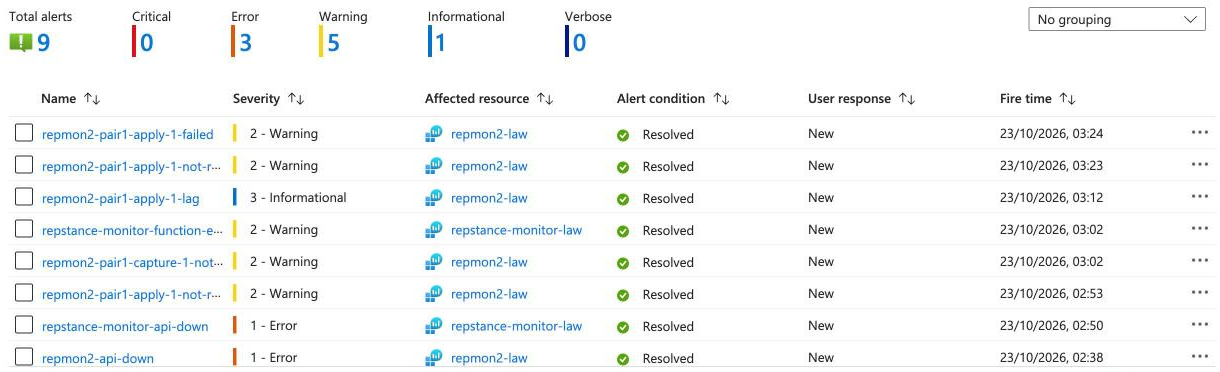
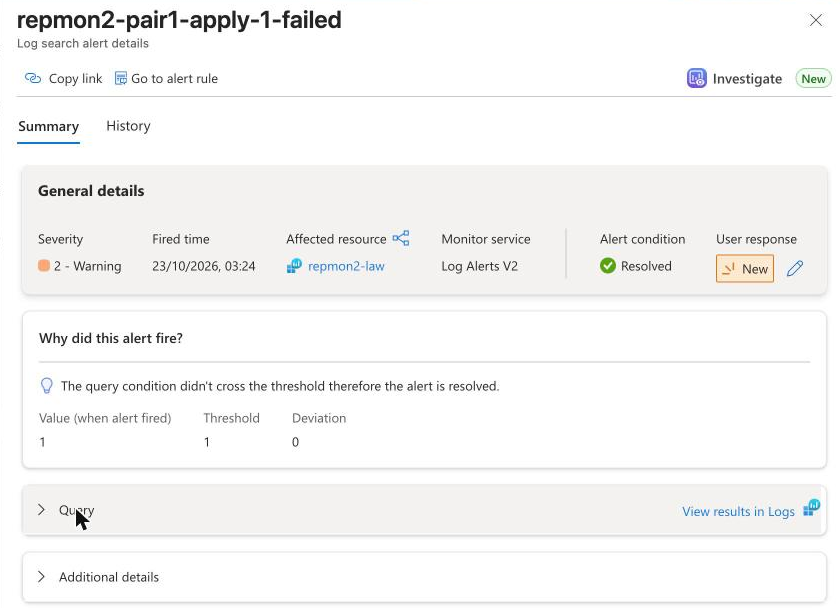
The list shows Fired alerts. The affected resource is the workspace, because the rules query it; the name of the rule tells which process it is about. Choose an alert for its details: the rule, the severity, the time it fired, and a link to the query and its result.
The rules of the first deployment
| Alert | It fires when |
|---|---|
| namePrefix-api-down (severity 1) | The newest 3 rows of the server say that the status command was not answered (ApiUp is 0): the Repstance server is down, or the function does not reach it. It also fires when the function delivers no row at all for 15 minutes, if it delivered rows during the last two days. The column Error of the rows tells the reason (see Install the Monitoring Function). |
| namePrefix-function-errors (severity 2) | A run of the function has failed: the log of the function app has the trace Executed 'Functions.poll' (Failed within the last 15 minutes. Read the exception in the table AppExceptions of the workspace. |
Be notified
A rule that has no action group only changes the state of its alert. Give the first deployment an e-mail address (alertEmail) and it creates an action group with that address for its two rules. For more than that, create an action group of your own: it can send e-mail, text messages and voice calls, push messages to the Azure mobile app, call a webhook, an Azure Function or a Logic App (to write to Microsoft Teams or Slack), or open a ticket. Give its resource id to the deployments as actionGroupResourceId:
az monitor action-group create --resource-group my-resource-group --name repstance-alerts --short-name repalerts \
--action email ops you@example.com usecommonalertschema
The action group notifies when an alert fires and when it is resolved (tested with a webhook).
What the messages look like, and what is normal
When an alert fires, every receiver of the action group gets a message. An e-mail receiver gets an e-mail with the rule, the severity, the time and a link to the alert. A webhook gets the alert as JSON in the common alert schema. The JSON below is a real one, shortened and with the names replaced: it is the alert apply-1-not-running of a replication whose Apply Process had failed, and it reached a webhook 3 seconds after the alert fired.
{
"schemaId": "azureMonitorCommonAlertSchema",
"data": {
"essentials": {
"alertId": "/subscriptions/00000000-0000-0000-0000-000000000000/providers/Microsoft.AlertsManagement/alerts/d2c503e1-e888-1a9b-dc41-...",
"alertRule": "repstance-monitor-orders-apply-1-not-running",
"severity": "Sev2",
"signalType": "Log",
"monitorCondition": "Fired",
"monitoringService": "Log Alerts V2",
"alertTargetIDs": [
"/subscriptions/00000000-0000-0000-0000-000000000000/resourcegroups/my-resource-group/providers/microsoft.operationalinsi..."
],
"firedDateTime": "2026-10-23T00:23:23.1503728Z",
"description": "The apply was not running in the last polls: it is stopped, has failed or has only been initialised.",
"investigationLink": "https://portal.azure.com/#view/Microsoft_Azure_Monitoring_Al...",
"region": "eastus"
},
"alertContext": {
"conditionType": "LogQueryCriteria",
"condition": {
"windowSize": "PT5M",
"allOf": [
{
"searchQuery": "RepstanceProcess_CL | where Instance == 'prod' and ProcessType == 'apply' and ProcessId == '1' and TimeGenerated > ago(15m) | top 3 by TimeGenerated d...",
"metricMeasureColumn": "Fire",
"operator": "GreaterThanOrEqual",
"threshold": "1",
"metricValue": 1.0,
"linkToSearchResultsUI": "https://portal.azure.com#@00000000-0000-0000-0000-0000000000..."
}
],
"windowStartTime": "2026-10-23T00:07:50Z",
"windowEndTime": "2026-10-23T00:22:50Z"
}
}
}
}
The fields that matter:
- alertRule is the name of the rule, severity is Sev1 for api-down, Sev2 for not-running, failed and function-errors, and Sev3 for lag, monitorCondition is Fired or Resolved, and description is the sentence of the rule.
- firedDateTime is the time that the alert fired (UTC); a message that says Resolved also has resolvedDateTime.
- searchQuery is the query that found the condition, and metricValue 1.0 is what it returned. windowStartTime and windowEndTime are the 15 minutes of rows that it looked at.
- investigationLink opens the alert in the portal, and linkToSearchResultsUI opens the query with its result.
How long it takes. The times are from a test with a replication of two tables between two Azure SQL databases, rules that run every 5 minutes, and pollsInAlarm 3 (the lag alert was tested with maxLagSeconds 30). The time is counted from the moment that I did the first thing in the table to the moment that the alert fired:
| What I did | The alert | Fired after |
|---|---|---|
| Stopped the Apply Process | apply-1-not-running | 6 minutes 18 seconds |
| Stopped the Capture Process | capture-1-not-running | 7 minutes |
| Made the Apply Process fail (a constraint on the table of the Target Database that rejects every new row) | apply-1-failed (and apply-1-not-running, 49 seconds earlier) | 7 minutes 48 seconds |
| Locked the table of the Target Database, so that the Apply Process waited (its lag was above 30 seconds from the 40th second) | apply-1-lag | 5 minutes 26 seconds after the lag was above the limit |
| Gave the function app the address of a server that does not exist | api-down | about 3 minutes after the first poll |
| Gave the function app a wrong address for Azure Monitor, so that every run failed | function-errors | 5 minutes 34 seconds after the first failed run |
When the cause was gone, the alerts were resolved after 13 to 18 minutes, and the alert function-errors after 28 minutes, because its rule looks back 15 minutes: an alert is resolved after three runs of its rule in a row that do not find the condition. The action group got the message Resolved 2 to 3 seconds after each of the three alerts that I watched.
These things look strange the first time. They are not faults:
- No first messages. A rule starts without a state: an alert exists only when a condition has been found, so a new deployment sends nothing until there is a problem.
- An alert at the start. If the token, the address, the fingerprint or the network of the first deployment are wrong, the function cannot read the server and api-down fires after the third poll. That is a true alert, not a false one: the column Error of RepstanceServer_CL says why (see Install the Monitoring Function). It is resolved about 15 minutes after the settings are right.
- Two alerts for one failure. A process that has failed is not running, so failed and not-running both fire.
- A server that does not answer. api-down fires. The rules of the processes look at the newest rows of the processes, which are the rows from before the server stopped, so they stay as they were.
- Give the rule its action group before the problem. In a test I gave the rules an action group while one of their alerts was fired. That alert sent its Resolved message, but another one, resolved four minutes after the change, did not. Deploy the action group with the rules, or while no alert is fired.
The parameters
| Parameter | What it is | Default |
|---|---|---|
| namePrefix | Name of this replication; the names of the alert rules start with it, then the kind and the id of the process. | repstance-monitor-orders |
| workspaceResourceId | Resource id of the Log Analytics workspace (the output workspaceResourceId of the deployment of azuredeploy.json). | none (give a value) |
| identityResourceId | Resource id of the user-assigned identity that runs the queries (the output alertIdentityResourceId of the same deployment). It needs the role Log Analytics Reader on the workspace. | none (give a value) |
| instanceName | The name of the server in the tables: the instanceName of the deployment of azuredeploy.json. | repstance |
| captureId | Id of the Capture Process to watch (the number in "Capture Process 1" of repcli status). 0: no alerts for a Capture Process. | 0 |
| applyId | Id of the Apply Process to watch. 0: no alerts for an Apply Process. | 0 |
| maxLagSeconds | The Apply Process is too far behind when its lag is above this number of seconds. | 300 |
| pollsInAlarm | How many polls in a row (the function polls once a minute) must be bad before an alert fires. An alert looks at the newest rows that have reached the workspace; they arrive 1 to 3 minutes late. | 3 |
| alertFrequencyMinutes | How often the alert rules run. | 5 |
| actionGroupResourceId | Resource id of the action group to notify (the same as for azuredeploy.json). Empty: the alerts change their state and notify nobody. | empty |
| location | Region of the alert rules (the region of the workspace). | the resource group of the deployment |
| tags | Tags for all resources. | none |
When you stop a replication on purpose
A stopped process is not running, so its alert fires. Delete the deployment of the replication (delete its rules), or switch its rules off while the replication is stopped:
az monitor scheduled-query update --resource-group my-resource-group --name repstance-monitor-orders-apply-1-not-running --disabled trueand switch them on again with --disabled false.
Prev page:
The Azure WorkbookNext page:
Table Reference- Repstance User Guide
- ABOUT REPSTANCE
- SUPPORTED DATABASE REQUIREMENTS
- GETTING STARTED WITH REPSTANCE
- INTERACTING WITH REPSTANCE SERVER
- CONFIGURE REPLICATION WITH REPSTANCE
- DATABASE CONFIGURATION COMMANDS
- PROCESS CONFIGURATION COMMANDS
- PROCESS CONTROL COMMANDS
- DATA COMPARISON
- REPSTANCE WEB USER INTERFACE
- REPSTANCE SERVER MAINTENANCE
- MONITORING WITH AMAZON CLOUDWATCH
- TROUBLESHOOTING AND FAQ
- GLOSSARY