

Install the Monitoring Function
This page installs the function app that sends the state of one Repstance server to Azure Monitor (see Monitoring with Azure Monitor). It takes about 20 minutes. The examples use the resource group my-resource-group, the server 10.0.1.5 and the name prod for the server.
Before you start
On the Repstance server, check that the REST API listens on port 8797:
sudo ss -ltn | grep 8797The answer has a line for the port:
LISTEN 0 4096 *:8797 *:*If there is no line, the file conf/repstance.conf does not exist or the server has not been restarted since it was created (see Configure repcli for Remote Access).
Then read the token and the fingerprint of the certificate of the REST API. You need them in step 2:
sudo sed -n 's/^token=//p' /opt/repstance/conf/repstance.conf
sudo openssl x509 -in /opt/repstance/cert/server.crt -noout -fingerprint -sha256
The first command prints the token. On the Azure edition it is the id of the virtual machine, for example 8f4c2a1e-6b3d-4f5a-9c0e-1d2b3a4c5d6e. The second prints the fingerprint, sha256 Fingerprint= and 32 pairs of hexadecimal digits separated by colons.
Write down also the resource id of the virtual network of the server, and an address range of at least /27 in it that nothing else uses (the template creates a subnet there for the function app):
az network vnet show --resource-group my-network --name my-vnet --query id --output tsv1. Download the files
The files are on this site, in the folder https://repstance.com/doc/azure/cloudwatch0001/. Download them into an empty folder, for example with curl:
curl -O https://repstance.com/doc/azure/cloudwatch0001/repstance-azure-monitor-1-0-0.zip
curl -O https://repstance.com/doc/azure/cloudwatch0001/azuredeploy.json
curl -O https://repstance.com/doc/azure/cloudwatch0001/azuredeploy-alerts.json
curl -O https://repstance.com/doc/azure/cloudwatch0001/sha256sums.txt
There are three files and the list of their checksums:
- repstance-azure-monitor-1-0-0.zip: the function app.
- azuredeploy.json: the ARM template of this page.
- azuredeploy-alerts.json: the template of Azure Monitor Alerts.
- sha256sums.txt: the SHA-256 checksum of each file.
Check the files in the folder that holds them (on macOS use shasum -a 256 -c):
sha256sum -c sha256sums.txtrepstance-azure-monitor-1-0-0.zip: OK
azuredeploy.json: OK
azuredeploy-alerts.json: OKThe template reads the function app from the same folder of this site when it runs: the parameter packageUri has its address as the default. To keep the zip file in your own storage (a blob with a read-only link, for example), upload it and give the address as packageUri.
2. Deploy the template
Replace the values with yours. The token is not written in the command: read -rs asks for it and keeps it in a variable, so that it does not stay in the history of the shell. The last parameter is an e-mail address for the alerts of the server; leave it out to get no notification (see Azure Monitor Alerts).
read -rs TOKEN
az deployment group create \
--resource-group my-resource-group \
--template-file azuredeploy.json \
--parameters \
repstanceUrl=https://10.0.1.5:8797 \
repstanceToken="$TOKEN" \
repstanceCertSha256=AB:CD:EF:01:23:45:67:89:AB:CD:EF:01:23:45:67:89:AB:CD:EF:01:23:45:67:89:AB:CD:EF:01:23:45:67:89 \
instanceName=prod \
vnetResourceId=/subscriptions/00000000-0000-0000-0000-000000000000/resourceGroups/my-network/providers/Microsoft.Network/virtualNetworks/my-vnet \
subnetAddressPrefix=10.0.250.0/27 \
alertEmail=you@example.com
The command waits until the deployment is done, five to seven minutes (the plan of the function app takes the longest), and prints the deployment as JSON, with "provisioningState": "Succeeded". In the portal: Deploy a custom template, Build your own template in the editor, Load file; the page Custom deployment then asks for the parameters of the table below.
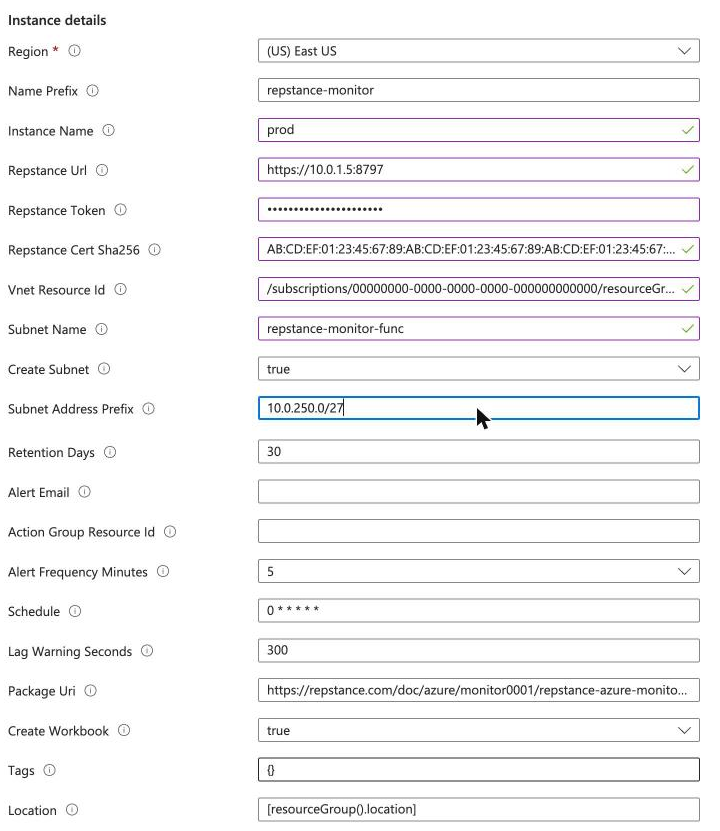
The deployment creates, all in the resource group, with names that start with the parameter namePrefix (repstance-monitor unless you change it):
- the function app (its name has a short suffix, because it has to be unique in Azure), the Flex Consumption plan, and a storage account for its code and state;
- a managed identity, and its roles on the storage account, on the data collection rule and on the workspace;
- the Log Analytics workspace (or the one that you name in existingWorkspaceName) with the two tables RepstanceProcess_CL and RepstanceServer_CL, a data collection rule that feeds them, and an Application Insights component for the log of the function app;
- a subnet in the virtual network of the server (the template creates it in the resource group of that network), delegated to Microsoft.App/environments;
- the alert rules namePrefix-api-down and namePrefix-function-errors, and, if you gave alertEmail, an action group with that address;
- the workbook Repstance prod (the name of the server after the word Repstance).
The names that you need later are the outputs of the deployment:
az deployment group show --resource-group my-resource-group --name azuredeploy --query properties.outputs3. Check that it works
The function app runs every minute. The first rows can take up to ten minutes to become searchable in a new workspace. In the portal open the workspace (its name is namePrefix-law), then Logs, and run:
RepstanceServer_CL
| order by TimeGenerated desc
| project TimeGenerated, ApiUp, Processes, Version, Error
| take 5
A server that answers has ApiUp 1 and the number of its processes in Processes. The column Error is empty then, and the portal does not show it:
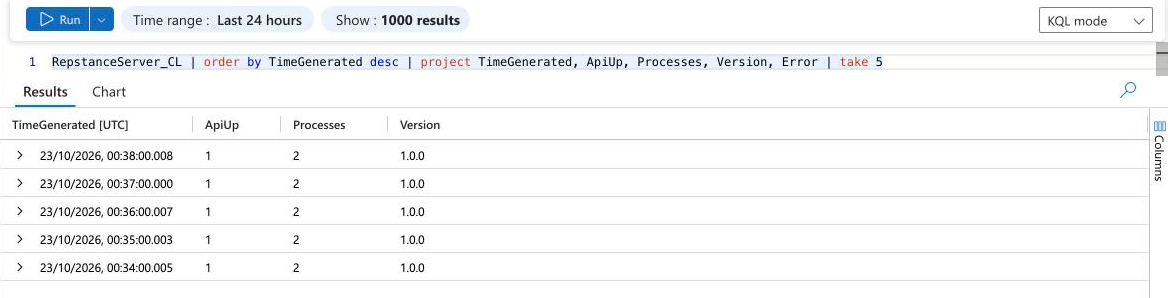
The table RepstanceProcess_CL has a row for every process and minute. The counters of a Capture Process and of an Apply Process differ, because each counts from the start of its own run:
RepstanceProcess_CL
| order by TimeGenerated desc, ProcessType asc
| project TimeGenerated, ProcessType, ProcessId, Running, Failed, LagSeconds, InsertsTotal
| take 6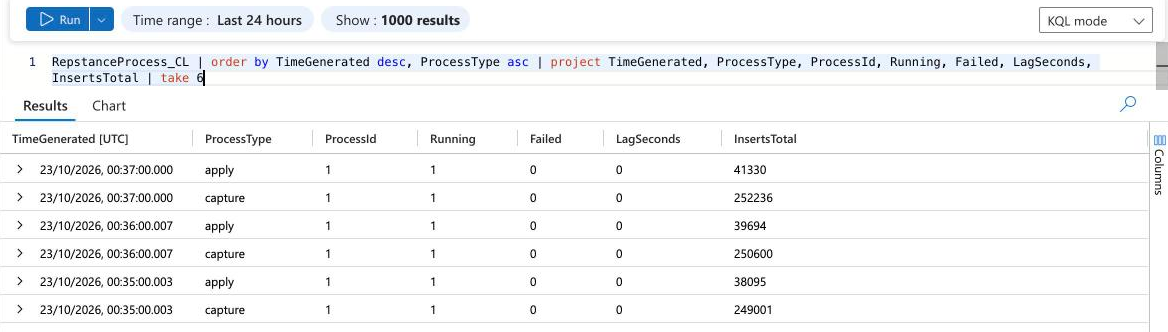
The function app also writes a line about every run to the log of the function app. It counts what the function did: servers is the number of Repstance servers, servers_down how many did not answer, server_rows and process_rows the rows written. servers_down has to be 0:
AppTraces
| where Message startswith "repstance-monitor"
| order by TimeGenerated desc
| project TimeGenerated, Message
| take 3
repstance-monitor 1.0.0 {"servers": 1, "servers_down": 0, "server_rows": 1, "process_rows": 2}If ApiUp is 0, the column Error tells why: see the table below.
The workbook is described on The Azure Workbook. Open it in the portal under Monitor, Workbooks, or in the resource group, or with its address, in which SUBSCRIPTION_ID is the id of your subscription and WORKBOOK is the output workbookName of the deployment:
https://portal.azure.com/#@/resource/subscriptions/SUBSCRIPTION_ID/resourceGroups/my-resource-group/providers/microsoft.insights/workbooks/WORKBOOK/workbookThe parameters
| Parameter | What it is | Default |
|---|---|---|
| namePrefix | Prefix of the names of all resources. The function app name also gets a short suffix, because it has to be unique in Azure. | repstance-monitor |
| instanceName | The name of this server in the tables: the value of the column Instance. | repstance |
| repstanceUrl | Address of the REST API of the Repstance server, reachable from the subnet below, for example https://10.0.1.5:8797 | none (give a value) |
| repstanceToken | The token of the REST API (the key token in conf/repstance.conf; on the Azure edition it is the VM id). | none (give a value) |
| repstanceCertSha256 | SHA-256 fingerprint of the certificate of the REST API. The certificate supplied with Repstance is self-signed, so the function trusts this fingerprint. Leave it empty only if the certificate is issued by a trusted certificate authority and the address uses the name in the certificate. | empty |
| vnetResourceId | Resource id of the virtual network of the Repstance server (the function is integrated with it). | none (give a value) |
| subnetName | Name of the subnet of the function in that virtual network. | repstance-monitor-func |
| createSubnet | true creates the subnet (delegated to Microsoft.App/environments); false uses an existing subnet with that delegation. | true |
| subnetAddressPrefix | Address range of the new subnet, for example 10.0.250.0/27. At least /27, used by nothing else. Needed when createSubnet is true. | none (give a value) |
| existingWorkspaceName | Name of an existing Log Analytics workspace in this resource group. Empty: a new workspace is created. | empty |
| retentionDays | How long the workspace keeps the rows (days). Used for a new workspace. | 30 |
| alertEmail | E-mail address that the alerts notify. Empty: the alerts change their state and notify nobody (unless actionGroupResourceId is given). | empty |
| actionGroupResourceId | Resource id of an existing action group that the alerts notify. Empty: the alerts use alertEmail. | empty |
| alertFrequencyMinutes | How often the alert rules run. A rule costs USD 1.50 a month at 5 minutes, 1.00 at 10 and 0.50 at 15 (the API refuses a rule that runs every minute for these queries). | 5 |
| schedule | How often the function reads the status (NCRONTAB, six fields). The default is every minute. | 0 * * * * * |
| lagWarningSeconds | The lag chart of the workbook draws a line at this number of seconds. Use the value of maxLagSeconds of the alerts. | 300 |
| packageUri | Address of the zip file with the function. The platform downloads it when the template runs. | the zip file of this site |
| createWorkbook | true creates the workbook. | true |
| tags | Tags for all resources. | none |
| location | Region of all resources. It must support the Flex Consumption plan. | the resource group of the deployment |
If it does not work
The function app does not stop when the server does not answer: it writes the error to the column Error of the row of the server and reports ApiUp 0. A row, shortened (the column Url is the address that the function called):
2026-10-22T23:36:00Z prod 0 0 https://10.0.1.5:8797 1.0.0 RuntimeError: the certificate of 10.0.1.5 has the SHA-256 fingerprint 5090...7302, not the pinned one| The error | What it means | What to do |
|---|---|---|
| RuntimeError: HTTP 401 from the status command | The token is wrong. | Read the token again (the first command of this page) and deploy again with it. |
| RuntimeError: the certificate of 10.0.1.5 has the SHA-256 fingerprint ... not the pinned one | The fingerprint of the deployment is not the one of the certificate that the server shows, for example after the certificate was replaced. The message gives the fingerprint that the server shows. | Deploy again with the fingerprint from the message, if the certificate is the one you expect. |
| TimeoutError: timed out | The function does not reach the server: the address, the port, the subnet, or a network security group or firewall in between. | Check that the server listens (the first command of this page), that the subnet of the function app reaches its private address, and that a network security group does not block port 8797. |
| No row at all after ten minutes | The function app does not run, or cannot write. Open the function app in the portal, then Functions, poll, Monitor, or query AppTraces and AppExceptions in the workspace. | A failed run is the trace Executed 'Functions.poll' (Failed; its exception says why. The alert rule function-errors goes off for it. |
| The deployment fails with "Resource temporarily unavailable" while it installs the code | The platform could not download the zip file from the address in packageUri: the subnet of the function app has no outbound access to the internet (the subnet that the template creates has it), or a firewall blocks the host of the address. | Use the subnet that the template creates, or give your subnet outbound access (a NAT gateway). Check that the address of packageUri opens from a computer outside your network, and deploy again. |
Update
A new version of the function app has a new file name. Run the command of step 2 again with the new template file, if there is one, and with packageUri set to the address of the new zip file. Repeat every parameter: Azure gives a parameter that you do not repeat its default value, not the value of the last deployment, so the token and the address would be lost. Keep the command in a file. The update takes about two minutes, and the version in the rows of the log tells which version runs.
Remove
If the resource group holds only this deployment, delete the group:
az group delete --name my-resource-groupOtherwise delete the resources of the deployment one by one. Their names start with the namePrefix; the storage account has a name that starts with st and the prefix without dashes, and the workbook has a name that is a number (the output workbookName). This list shows the names, and the order below worked:
az resource list --resource-group my-resource-group --query "[?starts_with(name, 'repstance-monitor')].{name:name, type:type}" --output table- the function app, then its plan (namePrefix-plan);
- the alert rules (Microsoft.Insights/scheduledQueryRules) and the workbook;
- the data collection rule, the Application Insights component, the storage account and the managed identity;
- the Log Analytics workspace;
- the subnet that the template created, in the virtual network of the server: az network vnet subnet delete. It can be deleted as soon as the function app and its plan are gone.
In a test this took two minutes and left nothing behind: the role assignments belong to the deleted resources and go with them. The rows in an existing workspace stay until their retention ends. A deleted Log Analytics workspace is kept for 14 days. If you deploy again with the same names in that time, Azure brings the old workspace back with all its rows, and the new deployment uses it. To delete the data for good, delete the workspace with --force true:
az monitor log-analytics workspace delete --resource-group my-resource-group --workspace-name repstance-monitor-law --force true --yesThe alert rules of Azure Monitor Alerts are in other deployments; delete them too.
Prev page:
MONITORING WITH AZURE MONITORNext page:
The Azure Workbook- Repstance User Guide
- ABOUT REPSTANCE
- SUPPORTED DATABASE REQUIREMENTS
- GETTING STARTED WITH REPSTANCE
- INTERACTING WITH REPSTANCE SERVER
- CONFIGURE REPLICATION WITH REPSTANCE
- DATABASE CONFIGURATION COMMANDS
- PROCESS CONFIGURATION COMMANDS
- PROCESS CONTROL COMMANDS
- DATA COMPARISON
- REPSTANCE WEB USER INTERFACE
- REPSTANCE SERVER MAINTENANCE
- MONITORING WITH AMAZON CLOUDWATCH
- TROUBLESHOOTING AND FAQ
- GLOSSARY