

Install the Metrics Function
This page installs the function that sends the metrics of one Repstance server to CloudWatch (see Monitoring with Amazon CloudWatch). It takes about 15 minutes. The examples use the Region US East (N. Virginia), the server 10.0.1.5 and the stack name repstance-cloudwatch-metrics.
Before you start
On the Repstance server, check that the REST API listens on port 8797:
sudo ss -ltn | grep 8797The answer has a line for the port:
LISTEN 0 4096 *:8797 *:*If there is no line, the file conf/repstance.conf does not exist or the server has not been restarted since it was created (see Configure repcli for Remote Access).
Then read the token and the fingerprint of the certificate of the REST API. You need them in step 3:
sudo sed -n 's/^token=//p' /opt/repstance/conf/repstance.conf
sudo openssl x509 -in /opt/repstance/cert/server.crt -noout -fingerprint -sha256
The first command prints the token. On the AWS edition it is the id of the EC2 instance, for example i-0123456789abcdef0. The second prints the fingerprint, sha256 Fingerprint= and 32 pairs of hexadecimal digits separated by colons. Write down also the id of the security group of the Repstance server, and the ids of the VPC and of two subnets of the VPC.
1. Download the files
The page Documents of this site has three files and the list of their checksums:
- repstance-cloudwatch-metrics-1-0-0.zip: the function.
- repstance-cloudwatch-metrics.yaml: the CloudFormation template of this page.
- repstance-cloudwatch-alarms.yaml: the template of CloudWatch Alarms.
- sha256sums.txt: the SHA-256 checksum of each file.
Check the files in the folder that holds them (on macOS use shasum -a 256 -c):
sha256sum -c sha256sums.txtrepstance-cloudwatch-metrics-1-0-0.zip: OK
repstance-cloudwatch-metrics.yaml: OK
repstance-cloudwatch-alarms.yaml: OK2. Put the function into an S3 bucket
CloudFormation reads the code of the function from an S3 bucket in the same Region as the stack. Use a bucket of yours:
aws s3 cp repstance-cloudwatch-metrics-1-0-0.zip s3://my-bucket/3. Create the stack
Replace the values with yours. The token is not written in the command: read -rs asks for it and keeps it in a variable, so that it does not stay in the history of the shell.
read -rs TOKEN
aws cloudformation deploy \
--stack-name repstance-cloudwatch-metrics \
--template-file repstance-cloudwatch-metrics.yaml \
--capabilities CAPABILITY_IAM \
--parameter-overrides \
RepstanceUrl=https://10.0.1.5:8797 \
RepstanceToken="$TOKEN" \
RepstanceCertSha256=AB:CD:EF:01:23:45:67:89:AB:CD:EF:01:23:45:67:89:AB:CD:EF:01:23:45:67:89:AB:CD:EF:01:23:45:67:89 \
InstanceName=prod \
RepstanceSecurityGroupId=sg-0123456789abcdef0 \
VpcId=vpc-0123456789abcdef0 \
SubnetIds=subnet-0123456789abcdef0,subnet-0fedcba9876543210 \
CodeBucket=my-bucket
The command waits until the stack is created, about five minutes, and ends with:
Successfully created/updated stack - repstance-cloudwatch-metricsIn the console: CloudFormation, Stacks, Create stack, With new resources (standard), then Choose an existing template and Upload a template file. The page Specify stack details asks for the name of the stack and the parameters, in the groups of the table below. The stack creates an IAM role: tick the box that acknowledges it on the last page.
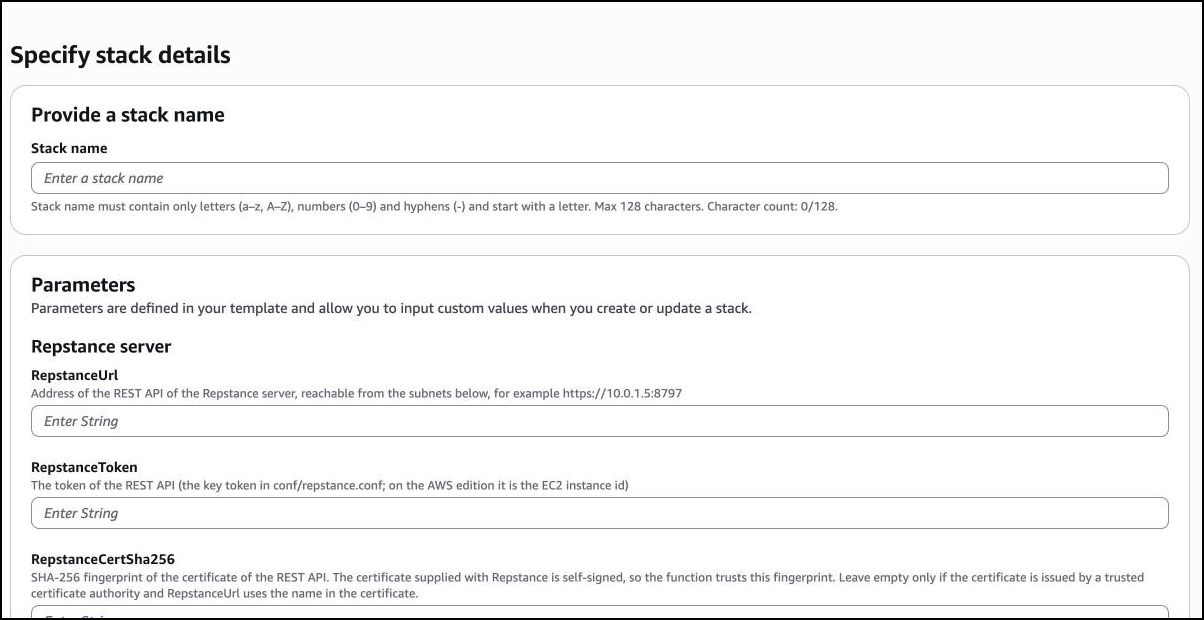
The stack creates:
- the function, and its IAM role with the AWS managed policy AWSLambdaVPCAccessExecutionRole only;
- a security group for the function that allows outbound traffic only to the REST port of the Repstance server, and the inbound rule for the function in the security group of the server;
- the log group of the function, and the rule that runs the function every minute;
- the alarms repstance-cloudwatch-metrics-api-down and repstance-cloudwatch-metrics-function-errors;
- the dashboard repstance-cloudwatch-metrics.
4. Check that it works
Call the function once:
aws lambda invoke --function-name repstance-cloudwatch-metrics \
--cli-binary-format raw-in-base64-out --payload '{}' out.json
cat out.json
{"servers": 1, "servers_down": 0, "records": 11, "metric_values": 112}The answer counts what the function did: servers is the number of Repstance servers, servers_down how many did not answer, records the records written (one for the server and one for every process: here 10 processes), and metric_values the values in them. servers_down has to be 0. If it is 1, see the table below.
After one or two minutes the metrics are in CloudWatch, in the namespace Repstance:
aws cloudwatch list-metrics --namespace Repstance \
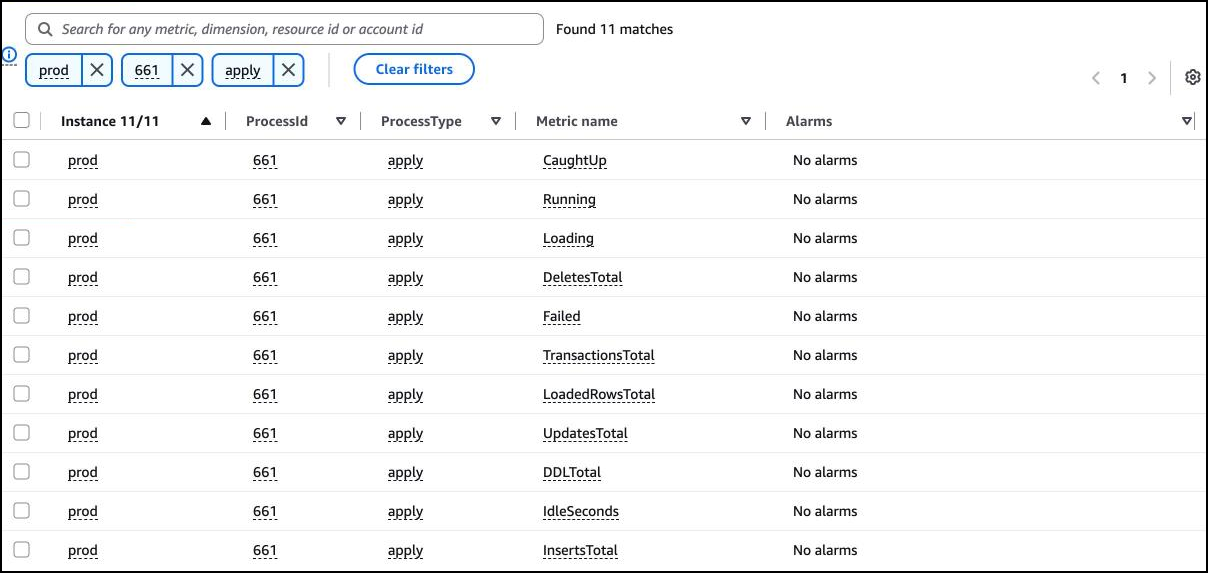
--dimensions Name=Instance,Value=prod --query 'length(Metrics)' --output text112The answer is the number of the metrics: here 11 for each of 10 processes that do not run, and 2 for the server. A process that runs has one more, LagSeconds.
In the console: CloudWatch, Metrics, All metrics, Repstance. The metrics are in two groups: Instance, ProcessId, ProcessType holds those of the processes, Instance those of the servers.
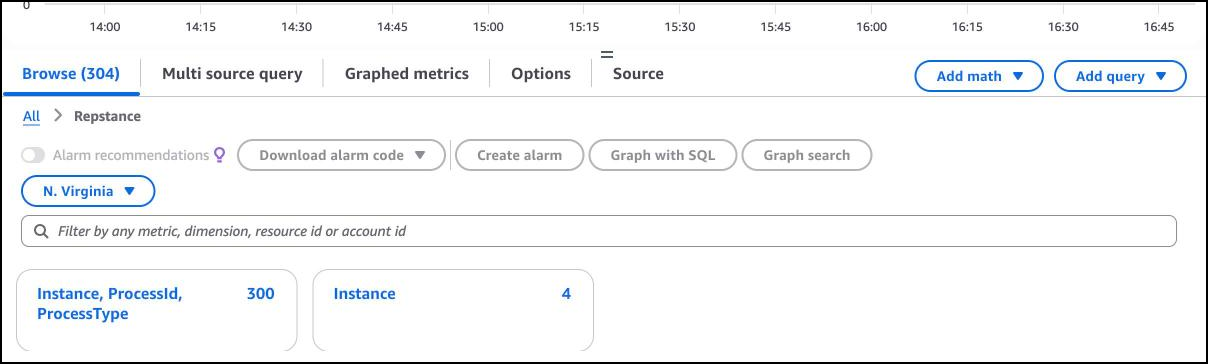
Type prod 661 apply into the search field to see the metrics of one process:
The address of the dashboard is the output DashboardUrl of the stack:
aws cloudformation describe-stacks --stack-name repstance-cloudwatch-metrics \
--query "Stacks[0].Outputs[?OutputKey=='DashboardUrl'].OutputValue" --output text
How to read it is on the page The CloudWatch Dashboard.
The parameters
| Parameter | What it is | Default |
|---|---|---|
| RepstanceUrl | The address of the REST API: https://, the private address of the server and the port, for example https://10.0.1.5:8797. | none |
| RepstanceToken | The token of the REST API. | none |
| RepstanceCertSha256 | The SHA-256 fingerprint of the certificate of the REST API, with or without colons. Leave it empty only if the certificate comes from a trusted certificate authority and the address in RepstanceUrl uses the name of the certificate. | empty |
| InstanceName | The name of this server in CloudWatch: the value of the dimension Instance of every metric. | repstance |
| RepstanceSecurityGroupId | The security group of the Repstance server. The stack adds an inbound rule for the REST port to it. | none |
| RepstancePort | The port of the REST API. | 8797 |
| VpcId | The VPC of the Repstance server. | none |
| SubnetIds | The subnets of the function, in that VPC: two, in two Availability Zones. They have to reach the private address of the server. | none |
| CodeBucket | The S3 bucket, in the same Region, that holds the zip file. | none |
| CodeKey | The name of the zip file in the bucket. | repstance-cloudwatch-metrics-1-0-0.zip |
| Schedule | How often the function reads the status. | rate(1 minute) |
| LogRetentionDays | How long CloudWatch Logs keeps the log of the function. | 14 |
| AlarmTopicArn | The SNS topic that the two alarms of this stack notify. Empty: the alarms change their state and notify nobody. | empty |
| CreateDashboard | true creates the dashboard, false does not. | true |
| LagWarningSeconds | The lag graph of the dashboard draws a dashed red line at this number of seconds. Use the number of MaxLagSeconds of the alarms. | 300 |
If it does not work
The function does not stop when the server does not answer: it writes the error to its log and reports ApiUp 0. The error is in the field Error of the record of the server in the log group /aws/lambda/repstance-cloudwatch-metrics:
aws logs tail /aws/lambda/repstance-cloudwatch-metrics --since 10m | grep ErrorA line of the answer, shortened (the field Url is the address that the function called):
2026-10-22T16:53:33.578000+00:00 2026/10/22/[$LATEST]... {"_aws":{...},"Instance":"prod","Url":"https://10.0.1.5:8797","Version":"1.0.0",
"Error":"RuntimeError: HTTP 401 from the status command","ApiUp":0,"Processes":0}| The error | What it means | What to do |
|---|---|---|
| RuntimeError: HTTP 401 from the status command | The token is wrong. | Read the token again (the first command of this page) and run the command of step 3 again with it. |
| RuntimeError: the certificate of 10.0.1.5 has the SHA-256 fingerprint ... not the pinned one | The fingerprint of the stack is not the one of the certificate that the server shows, for example after the certificate was replaced. The message gives the fingerprint that the server shows. | Run the command of step 3 again with the fingerprint from the message, if the certificate is the one you expect. |
| TimeoutError: timed out | The function does not reach the server: the address, the port, the subnets or a firewall. | Check that the server listens (the first command of this page), that the subnets reach its private address, and that the inbound rule of the stack is in its security group. |
Update
A new version of the function has a new file name. Put it into the bucket (step 2) and run the command of step 3 again with one more parameter, CodeKey, the name of the new file (and with the new template file, if there is one). Parameters that you do not repeat keep their values. The update takes less than a minute, and the field Version of the records in the log tells which version runs.
Remove
aws cloudformation delete-stack --stack-name repstance-cloudwatch-metricsThis deletes the function, its role and log, the schedule, the alarms, the dashboard and the inbound rule of the security group of the Repstance server. The zip file in your bucket and the metrics that CloudWatch has already stored stay. The alarms of CloudWatch Alarms are in other stacks; delete them too. The deletion of a function in a VPC is slow, because AWS releases its network interfaces last: the stack can stay in DELETE_IN_PROGRESS for about 20 minutes.
Prev page:
MONITORING WITH AMAZON CLOUDWATCHNext page:
The CloudWatch Dashboard- Repstance User Guide
- ABOUT REPSTANCE
- SUPPORTED DATABASE REQUIREMENTS
- GETTING STARTED WITH REPSTANCE
- INTERACTING WITH REPSTANCE SERVER
- CONFIGURE REPLICATION WITH REPSTANCE
- DATABASE CONFIGURATION COMMANDS
- PROCESS CONFIGURATION COMMANDS
- PROCESS CONTROL COMMANDS
- DATA COMPARISON
- REPSTANCE WEB USER INTERFACE
- REPSTANCE SERVER MAINTENANCE
- TROUBLESHOOTING AND FAQ
- GLOSSARY