

Database Sync from Backup
This example brings the Target Database to the state of the Source Database by restoring a backup of the Source, and then keeps the two databases in sync. It is the alternative to the Initial Load (see Initial Data Migration) for the first synchronization of the data: the Initial Load copies the tables with Repstance, here the backup and restore tools of the database move the data. The Source stays in use during the whole procedure: nobody has to stop working in it. The steps are the same whether you set up a replication or migrate a database. The Source and the Target are SQL Server databases. The commands are typed in repcli. The same configuration can be made in the Web UI (see Setup First Replication) or with the REST API.
How it works
From the moment that it runs, the Capture Process writes every change of the Source Database to trail files. A full backup of the Source contains every change that was committed before the backup ended. A Target that is restored from that backup lacks only the changes that were committed after it, and they are in the trail files. So the Apply Process has to start with the first change after the backup, not with the first change in the trail files. The command validate tells the position of the backup in the Source, and the command reset moves the Apply Process there.
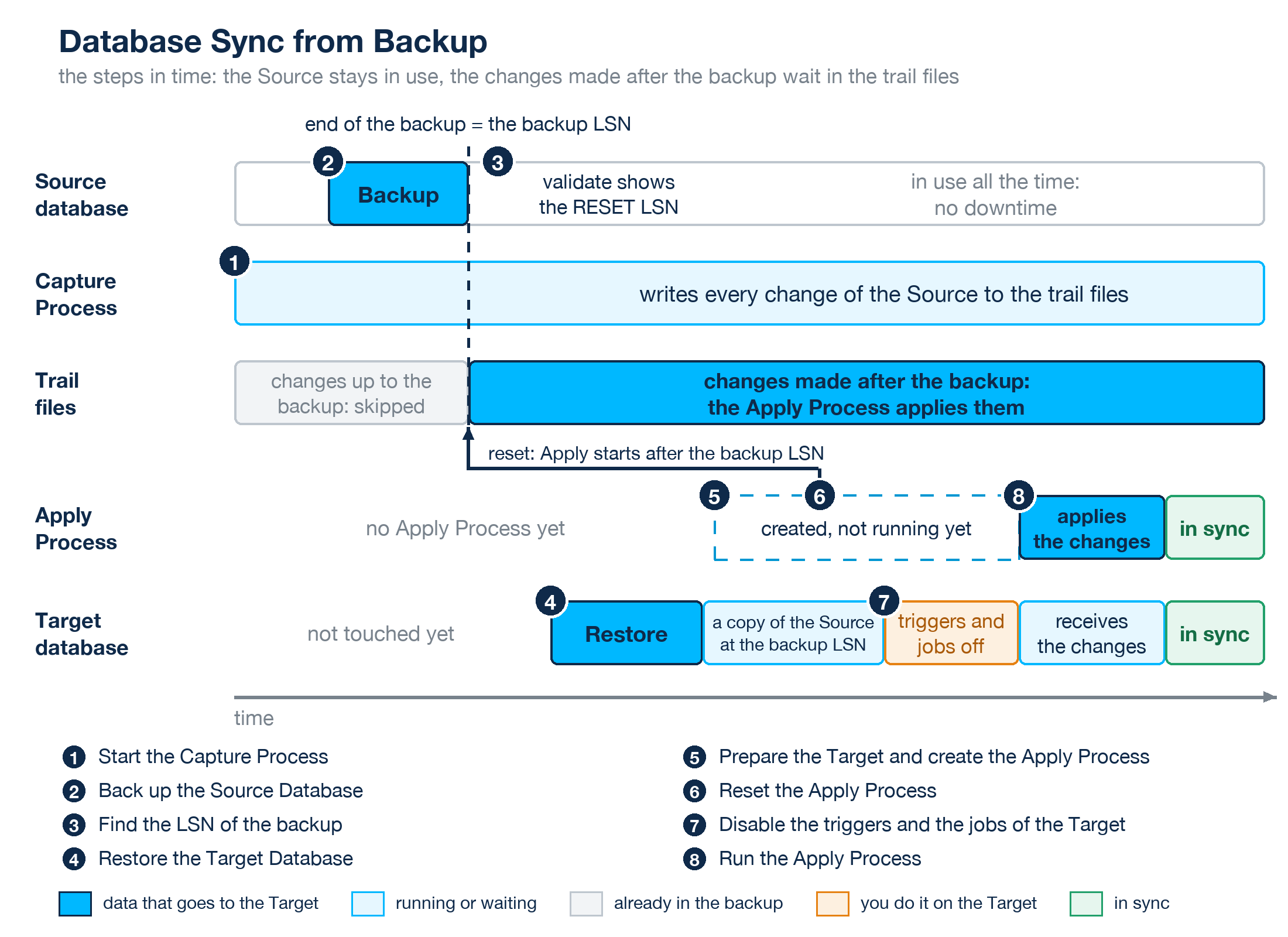
The picture shows the steps in time. The dotted line is the end of the backup, the backup LSN: the restored Target has all the changes up to this line, and the trail files have all the changes after it, because the Capture Process was started first.
Initial Load or backup and restore?
Both ways give the Target the data of the Source while the Source is in use, and both end with the Apply Process, which applies the changes that were made in the meantime. They differ in what they copy and in who moves the data.
| Initial Load | Backup and restore | |
|---|---|---|
| Databases | Any Source and Target that Repstance supports, also two different databases: SQL Server to Oracle, for example (see Initial Data Migration). | The same database system on both sides. This page describes SQL Server to SQL Server; the Target SQL Server has to be the same version as the Source or a later one. |
| What is copied | The tables that you select with loadinclude: all the rows, or the rows that a filter selects (see Initial Load). | The whole database: its tables with their data and its other objects, such as indexes, views, procedures and triggers. |
| Who moves the data | Repstance. The Capture Process reads the rows in the Source and the Apply Process inserts them into the Target. | The backup and the restore of the database. A backup copies the pages of the database: nobody selects and inserts rows. |
| The tables of the Target | Repstance can create a missing table, recreate a table, empty it or merge the rows into it (the load options C, R, T, D and M), and it converts the data types when the two databases differ. | The restore brings the tables as they are in the Source: nothing is created or converted. The triggers and the jobs that come with the restored database have to be disabled (step 7). |
| Big tables | A chunk splits a table into pieces by its primary key or unique index. A table without such a key is loaded in one piece. | The size and the keys of a table do not matter for the restore. |
| While the data is moved | The Capture Process and the Apply Process work from the start. The Apply Process takes the rows of the load, and then the changes that were made during it. | The Capture Process writes the changes that are made during the backup and the restore to the trail files, and nothing deletes them before the Apply Process has applied them (see Housekeeping): the Repstance server needs free space for them. The Apply Process runs after the restore. |
| Loading again | Any table can be loaded again later, alone (see Initial Load). | A new run means a new backup, a new restore of the whole database and a new reset. |
Use the Initial Load when:
- the Source and the Target are different database systems, for example SQL Server and Oracle: a backup cannot be restored into another system;
- only some tables, or some rows of a table, have to be copied;
- you want to stay inside Repstance: it creates the tables, loads them and keeps them in sync, and there is no backup and no restore to organize;
- a table has to be loaded again later.
Use a backup when:
- the Source and the Target are SQL Server databases;
- the database is big, and you want the backup and the restore of the database to move the data, not a copy of the rows through Repstance;
- the Target has to be a copy of the whole database, with the indexes, views, procedures and triggers of the Source.
What you need
- Repstance is running and repcli can reach it (see Fully Interactive Mode). The Source Database is testDB on db-src.example.com. The Target Database is testDB on db-tgt.example.com, a SQL Server to which you can restore a backup of the Source. The login repuser with the password Passw0rd123 has the privileges that are described in Database Privileges; to list the backups it must also be able to read msdb.
- Free space on the Repstance server. The Capture Process writes trail files from step 1, and nothing deletes a trail file before an Apply Process has applied it (see Housekeeping). The space has to last until the Apply Process runs in step 8.
1. Start the Capture Process
Prepare the Source Database and create the Capture Process as in Basic Replication Configuration, and run it. Do not create the Apply Process yet:
repcli>prepare database=source dbtype=mssql server=db-src.example.com port=1433 user=repuser password=Passw0rd123 dbname=testDB
[Completed]: Database [db-src.example.com:1433,testDB] has been prepared.
repcli>prepare process=capture id=1 dbtype=mssql name=rep1 server=db-src.example.com port=1433 user=repuser password=Passw0rd123 dbname=testDB dmlinclude=dbo.% ddlinclude=dbo.%
[Completed]: Capture 1 has been addedrepcli>run process=capture id=1
[In Process]: Command [RUN] has been sent. Use [status] command to monitor the Capture 1 processCheck with status (see Status of any Capture or Apply Processes) that the Capture Process is running and waiting for transactions:
repcli>status process=capture
Capture Process 1, Name: rep1, DB: testDB, Server: db-src.example.com
  RUN (In Process), Waiting for Transactions
    Last Source DB Change   :  2026/10/20 19:19:00.513 UTC (0x0000008D000091E20007)
    Last Captured DB Change :  2026/10/20 19:19:00.513 UTC (0x0000008D000091E20007)
2. Back up the Source Database
Make a full backup of the Source Database when the Capture Process is running. The Source stays in use during the backup. The backup has to be a full backup: validate lists the full backups, not the differential or the log backups. For example:
BACKUP DATABASE testDB TO DISK = N'D:\Backup\testDB.bak' WITH INIT, CHECKSUMAny backup tool can be used, as long as it records its backups in msdb.
3. Find the LSN of the backup
Run validate for the Source Database (see Validate Database). For a SQL Server Source the answer has a line RESET LSN for each full backup of the database that is recorded in msdb and that the CDC data of the Source still reaches (see SQL Server as Source). The line has the LSN of the last change that the backup contains, the file of the backup as msdb records it and the date when the backup ended:
repcli>validate database=source dbtype=mssql server=db-src.example.com port=1433 user=repuser password=Passw0rd123 dbname=testDB
[Valid]: Database TESTDB is valid
 RESET LSN: 0x00000040000007AC0007 FILE:{E69BB026-FAAC-42F8-A3C1-F6EF8AD9E8B6}5 DATE:2026-10-19T18:33:04Z
Find your backup by the file and the date, and note its LSN: 0x00000040000007AC0007 in the example. If there is no line for your backup, the backup is not a full backup, or the login cannot read msdb, or the backup was made before CDC was enabled for the Source (that is before step 1), or the CDC data that goes back to the backup has been cleaned already. Run validate soon after the backup (see the parameter housekeeping in SQL Server as Source).
4. Restore the Target Database
Restore the backup to the Target server. Restore it with recovery (the default), so that the database is online and can be changed. For example:
RESTORE DATABASE testDB FROM DISK = N'D:\Backup\testDB.bak' WITH RECOVERYAdd MOVE clauses if the files of the database go to other folders on the Target server. After the restore the Target Database holds the data of the Source as of the end of the backup.
5. Prepare the Target and create the Apply Process
The Apply Process keeps its position in the Target Database, so the Target is prepared too (see Prepare Target Database). The restored database has the schema repi of the Source already: prepare creates the objects that are missing.
repcli>prepare database=target dbtype=mssql server=db-tgt.example.com port=1433 user=repuser password=Passw0rd123 dbname=testDB
[Completed]: Database [db-tgt.example.com:1433,testDB] has been prepared.
Create the Apply Process, but do not run it. A new Apply Process starts with the first change in the trail files, and the changes that were made before the end of the backup are in the restored database already:
repcli>prepare process=apply id=1 dbtype=mssql capturename=rep1 server=db-tgt.example.com port=1433 user=repuser password=Passw0rd123 dbname=testDB
[Completed]: Apply 1 has been added
6. Reset the Apply Process
Make the Apply Process start after the backup (see Reset Process). The LSN is the one of step 3, and skip=1 says that the process starts after the transaction with this LSN, which the backup contains already. The Apply Process can start only from an LSN that is in the trail files: check with status process=capture that Last Captured DB Change is this LSN or a later one.
repcli>reset process=apply id=1 lsn=0x00000040000007AC0007 skip=1
[In Process]: Command [RESET] has been sent. Use [status] command to monitor the process
The command returns at once. RESET (Completed) in the status of the Apply Process means that its position is set and that it waits to be run:
repcli>status process=apply
Apply Process 1, Transactions Provider (Capture): rep1, DB: testDB, Server: db-tgt.example.com
  RESET (Completed), Waiting for the Next Command
If the status is RESET (Failed) with the message LSN ... has not been found. Available LSN/LSNs: ..., the LSN is not in the trail files. When the message names two LSNs, reset again with the first one and skip=1: the Apply Process then starts with the first change after the backup. When it names one LSN that is later than the LSN of the backup, the trail files do not reach back to the backup, because the Capture Process was started after it: make a new backup. When it names one LSN that is earlier, the Capture Process has not yet captured the changes up to the backup: wait for it and reset again.
7. Disable the triggers and the jobs of the Target
The restored database brings the triggers of its tables with it, and the Target server can run SQL Server Agent jobs that change data. The Apply Process changes the Target as an application does: every trigger fires for the changes that it applies, and the jobs work on top of changes that the Source has made already. Disable them before you run the Apply Process. For example:
DISABLE TRIGGER ALL ON dbo.Orders;
EXEC msdb.dbo.sp_update_job @job_name = N'Nightly import', @enabled = 0;
A trigger that was created with the option NOT FOR REPLICATION does not fire when the Apply Process runs with repuser=1, and ddldisabletriggers=1 disables the triggers of a table after a replicated DDL statement on it (see SQL Server Apply Parameters).
8. Run the Apply Process
Run the Apply Process (see Run any Capture or Apply Processes):
repcli>run process=apply id=1
[In Process]: Command [RUN] has been sent. Use [status] command to monitor the Apply 1 process
It applies the changes that were made since the backup. The line Lag of status is the difference between the last change of the Source that the process knows and the last one that it has applied. It falls while the backlog is applied, and the databases are in sync when it is 00:00:00.000. DATA COMPARISON compares the data of the two databases.
Switch to the Target
To migrate the database, switch the application to the Target when the lag is 00:00:00.000: stop the application that writes to the Source, wait until status shows that the Apply Process has no lag, stop the Apply Process and the Capture Process (see Stop any Capture or Apply Processes), enable the triggers and the jobs of the Target and start the application with the Target. The Source was in use until the moment of the switch.
Next steps
- Initial Data Migration is the other way to the first synchronization of the data: the Initial Load copies the tables, and no backup is needed.
- Reset Process describes the command that sets the position of a process.
- Backup Repstance Files tells which Repstance files to back up.
Prev page:
Objects and Data TransformationNext page:
DATABASE CONFIGURATION COMMANDS- Repstance User Guide
- ABOUT REPSTANCE
- SUPPORTED DATABASE REQUIREMENTS
- GETTING STARTED WITH REPSTANCE
- INTERACTING WITH REPSTANCE SERVER
- DATABASE CONFIGURATION COMMANDS
- PROCESS CONFIGURATION COMMANDS
- PROCESS CONTROL COMMANDS
- DATA COMPARISON
- REPSTANCE WEB USER INTERFACE
- REPSTANCE SERVER MAINTENANCE
- TROUBLESHOOTING AND FAQ
- GLOSSARY