

CloudWatch Alarms
An alarm watches a metric and changes its state when the metric is bad for some minutes: OK, In alarm, or Insufficient data when there are no values. An alarm can also notify an Amazon SNS topic. This page describes the alarms of a replication, and the two alarms that the stack of Install the Metrics Function creates.
The alarms of a replication
One stack creates the alarms for one Capture Process and one Apply Process of a server. Create a stack for every replication that you want to watch. The stack is in the file repstance-cloudwatch-alarms.yaml (see Install the Metrics Function for the download):
aws cloudformation deploy \
--stack-name repstance-cloudwatch-alarms-orders \
--template-file repstance-cloudwatch-alarms.yaml \
--parameter-overrides InstanceName=prod CaptureId=1 ApplyId=1
The stack needs no IAM capability. It creates up to five alarms: the name of an alarm is the name of the stack, the kind and the id of the process, and what it watches.
| Alarm | It goes off when | What to do |
|---|---|---|
| capture-1-not-running, apply-1-not-running | The process is not running for 3 of the last 5 minutes: it is stopped, it has failed or it has only been initialised (the metric Running is 0). | Look at the state of the process (see Status of any Capture or Apply Processes) and run it (see Stop/Run Replication Processes). |
| capture-1-failed, apply-1-failed | The process has failed for 3 of the last 5 minutes (the metric Failed is 1). | Read the error in the state of the process, in its log and in the incidents (see Capture and Source Databases, Apply and Target Databases and Logs and Information for Support). |
| apply-1-lag | The lag of the Apply Process is above 300 seconds for 3 of the last 5 minutes. | See whether the process is busy with an Initial Load, or slow (see The CloudWatch Dashboard). |
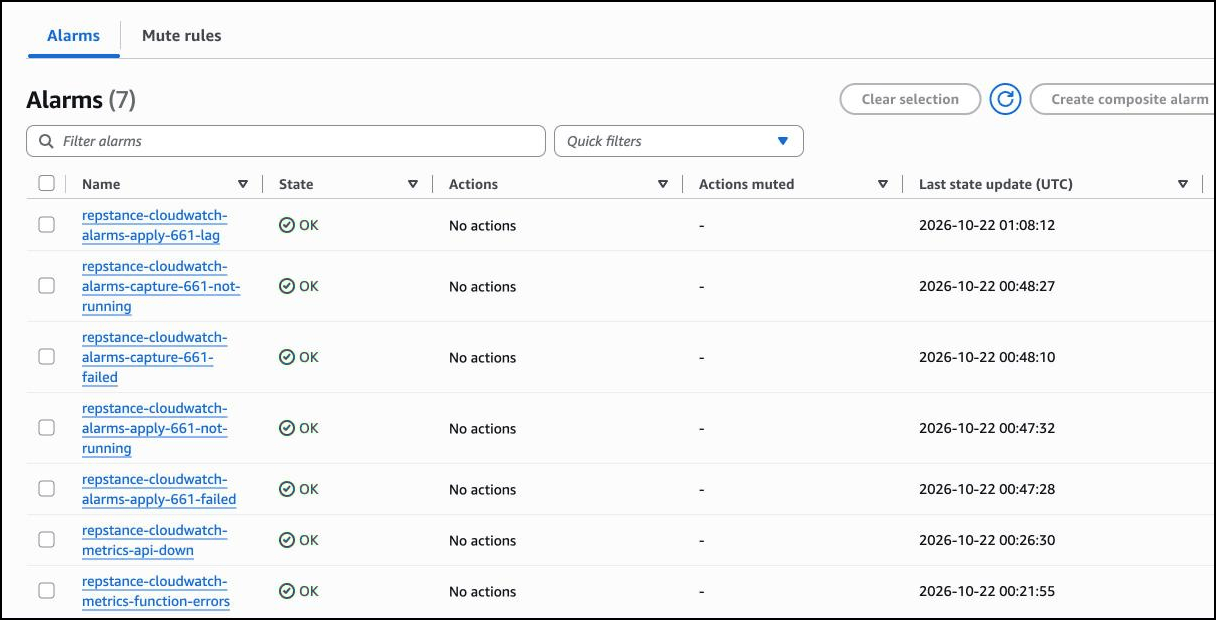
A process that has failed is also not running, so both alarms go off. The failed alarm tells the reason. If a process fails and restarts again and again, it is not running only part of the time, and this is why the alarms look at 3 of 5 minutes and not at 3 minutes in a row. When a metric has no values, for example because the server is down, these alarms do not go off: the alarm repstance-cloudwatch-metrics-api-down of the metrics stack tells it.
An example: the lag
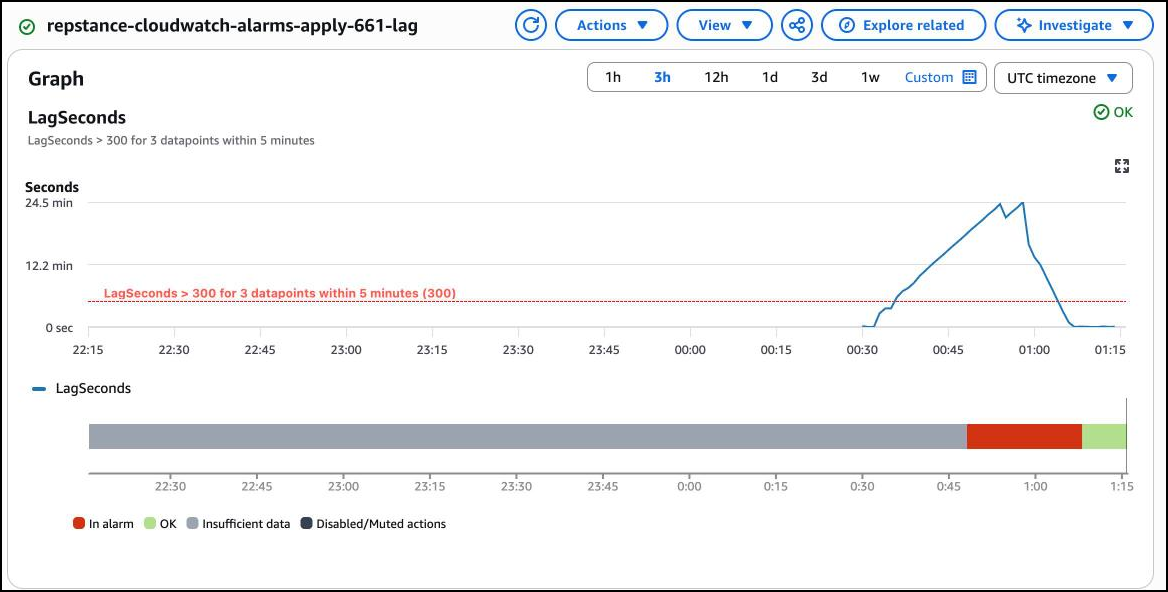
The graph is the alarm apply-661-lag of the replication on the page The CloudWatch Dashboard. The alarm was created at 00:47, when the lag was already above 300 seconds. It went off at 00:48, while the Apply Process was still loading, and it was OK again at 01:08, a minute after the lag was closed. The coloured bar under the graph is the state of the alarm over time: grey before the alarm existed, red while it was on, green after.
An example: a process that has failed or has stopped
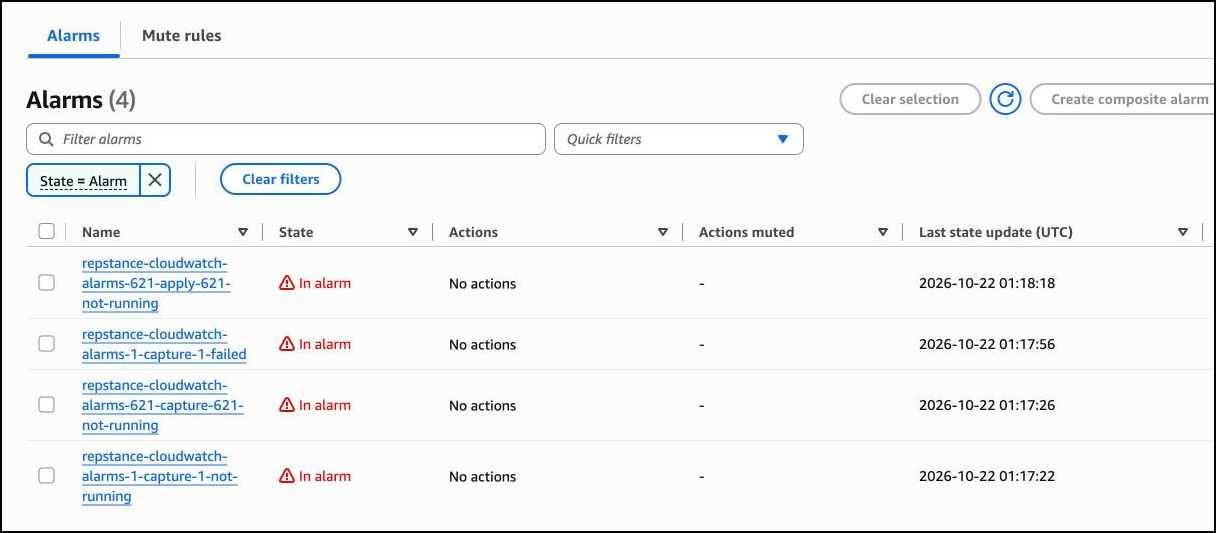
The list below is filtered to the alarms that are on. The Capture Process 1 has failed, because it could not reach its Source Database, so it is not running either. The Capture Process 621 and the Apply Process 621 have been stopped.
The alarms of the metrics stack
| Alarm | It goes off when |
|---|---|
| repstance-cloudwatch-metrics-api-down | The function got no answer to the status command for 3 minutes in a row, or no values arrive at all (the metric ApiUp is below 1). The Repstance server is down, or the function does not reach it. |
| repstance-cloudwatch-metrics-function-errors | The function itself has failed (the metric Errors of AWS Lambda is 1 or more in 5 minutes). Read its log in /aws/lambda/repstance-cloudwatch-metrics. |
Be notified
An alarm that has no action only changes its state. To be notified, create an SNS topic, subscribe to it, and give its ARN to the stacks:
aws sns create-topic --name repstance-alerts
aws sns subscribe --topic-arn arn:aws:sns:us-east-1:123456789012:repstance-alerts \
--protocol email --notification-endpoint you@example.com
AWS sends a message to the address; confirm the subscription. Then run the command that creates the stack again with one more parameter, AlarmTopicArn= and the ARN of the topic. The alarms notify the topic when they go off and when they recover. The topic can also send text messages or messages to a chat tool: see the documentation of Amazon SNS.
The parameters
| Parameter | What it is | Default |
|---|---|---|
| InstanceName | The name of the server in CloudWatch: the parameter InstanceName of the metrics stack. | repstance |
| CaptureId | The id of the Capture Process to watch (the number in "Capture Process 1" of repcli status). 0: no alarms for a Capture Process. | 0 |
| ApplyId | The id of the Apply Process to watch. 0: no alarms for an Apply Process. | 0 |
| MaxLagSeconds | The Apply Process is too far behind when its lag is above this number of seconds. | 300 |
| EvaluationMinutes | The number of the last minutes that every alarm looks at. | 5 |
| MinutesInAlarm | How many of those minutes must be bad before the alarm goes off (not more than EvaluationMinutes). | 3 |
| AlarmTopicArn | The SNS topic that the alarms notify, when they go off and when they recover. Empty: nobody is notified. | empty |
When you stop a replication on purpose
A stopped process is not running, so its alarm goes off. Delete the stack of the replication (aws cloudformation delete-stack), or keep the stack and switch off the notifications while the replication is stopped:
aws cloudwatch disable-alarm-actions --alarm-names repstance-cloudwatch-alarms-orders-apply-1-not-runningand switch them on again with enable-alarm-actions.
Prev page:
The CloudWatch DashboardNext page:
Metrics Reference- Repstance User Guide
- ABOUT REPSTANCE
- SUPPORTED DATABASE REQUIREMENTS
- GETTING STARTED WITH REPSTANCE
- INTERACTING WITH REPSTANCE SERVER
- CONFIGURE REPLICATION WITH REPSTANCE
- DATABASE CONFIGURATION COMMANDS
- PROCESS CONFIGURATION COMMANDS
- PROCESS CONTROL COMMANDS
- DATA COMPARISON
- REPSTANCE WEB USER INTERFACE
- REPSTANCE SERVER MAINTENANCE
- TROUBLESHOOTING AND FAQ
- GLOSSARY