

Monitoring with Amazon CloudWatch
Repstance shows the state of its processes in the Web UI and in repcli, and it can send an e-mail when a process fails (see Monitoring Replication). If Repstance runs on Amazon Web Services, you can also send the state and the speed of every Capture Process and Apply Process to Amazon CloudWatch. There you draw them on a dashboard and get an alarm when a process stops, fails or falls behind.
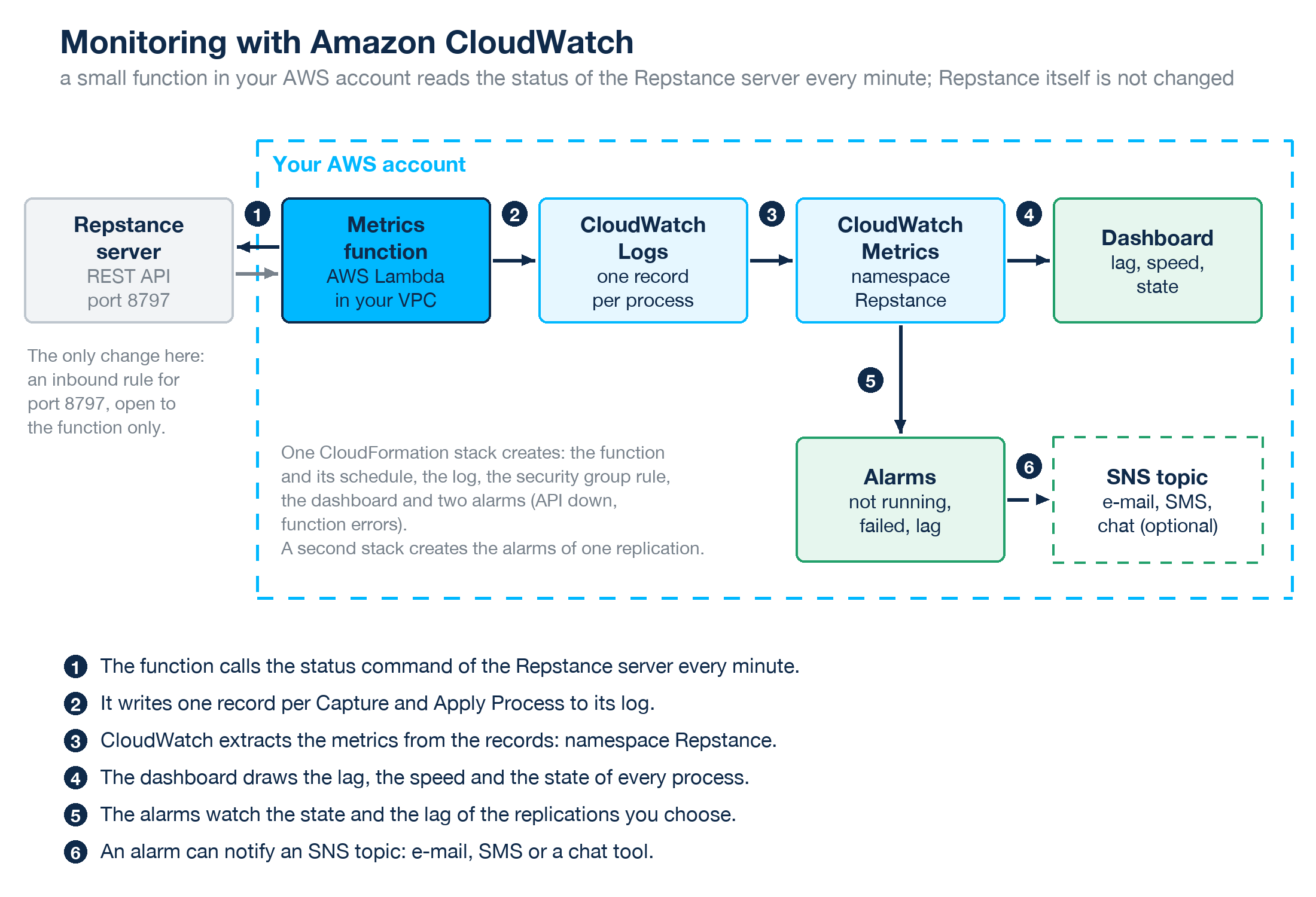
Repstance itself is not changed. A small function in your AWS account calls the status command of the REST API every minute and writes the numbers to CloudWatch. One CloudFormation template creates the function, the dashboard and two alarms; a second template creates the alarms of a replication.
What you get
- Metrics. Up to 12 for every Capture Process and Apply Process and 2 for every server: the state, the lag, and the counters of the changes and of the loaded rows (see Metrics Reference).
- A dashboard. The state of all the processes, and the lag and the speed of one replication, a pair of a Capture Process and an Apply Process (see The CloudWatch Dashboard).
- Alarms. A process that is not running or has failed, an Apply Process that is too far behind, and a Repstance server that does not answer (see CloudWatch Alarms). An alarm can notify an Amazon SNS topic, which sends an e-mail, a text message or a message to a chat tool.
What you need
- An AWS account, and the permission to create a CloudFormation stack that contains an IAM role, a Lambda function, a security group rule, CloudWatch alarms and a dashboard.
- A Repstance server that the function can reach on its private address. The function runs in a VPC of your account, so the server is an EC2 instance in that VPC, or it can be reached from it.
- The REST API of the server on port 8797. The port is open when the file conf/repstance.conf exists, and the AWS, Azure and on-premises editions create it when the server starts for the first time (see Configure repcli for Remote Access).
- The AWS CLI version 2, or the AWS Management Console.
- The files of the function: two templates and a zip file, from the page Documents of this site.
What it costs
CloudWatch and Lambda charge your AWS account. The prices below are the list prices of the Region US East (N. Virginia) at the time of writing; see CloudWatch pricing and Lambda pricing for the current ones. Every process that exists is published, also a process that is stopped.
| Item | Price | One replication (a Capture Process and an Apply Process) |
|---|---|---|
| Custom metrics | USD 0.30 per metric per month (the first 10,000) | 12 + 12 + 2 = 26 metrics, about USD 7.80 per month |
| Alarms | USD 0.10 per alarm per month | 5 alarms for the replication and 2 for the server, USD 0.70 per month |
| Dashboard | The first three dashboards of an account are free, if each shows up to 50 metrics | free for a few processes |
| Lambda function | The first million requests and 400,000 GB-seconds of every month are free | The function runs 43,200 times a month for about 0.32 seconds (measured) with 128 MB: about 1,700 GB-seconds, free |
| CloudWatch Logs | USD 0.50 per GB ingested | The function writes about 15 MB a day for 10 processes (measured), so a few cents per month |
So one replication costs about USD 8.50 per month, and every further pair of processes about USD 7.20 more (USD 7.70 with the alarms of its own).
Security
- The function needs the token of the REST API. It is kept in the environment variables of the function, which AWS encrypts at rest, and everybody who may read the configuration of the function can read the token. On the AWS edition the token is the id of the EC2 instance.
- The function sends only the status command, and the stack opens port 8797 of the Repstance server only to the security group of the function. Keep the port closed to everything else.
- The certificate supplied with Repstance is self-signed, so the function trusts the SHA-256 fingerprint that you give it instead of a certificate chain. To replace it with a certificate of your own, see Configure repcli for Remote Access. After the replacement give the stack the fingerprint of the new certificate; for a certificate of a trusted certificate authority leave the fingerprint empty and use the name of the certificate in the address (see the parameters on Install the Metrics Function).
Limits
- CloudWatch is a service of AWS. For a Repstance server on Azure or on premises the function helps only if the server can be reached from a VPC of your account.
- One stack watches one Repstance server. For another server create another stack.
- The numbers are as fresh as the last minute. The counters count from the start of the current run of a process, as the numbers of repcli do (see Status of any Capture or Apply Processes).
In this section
- Install the Metrics Function: download, install, check, update and remove the function.
- The CloudWatch Dashboard: how to read the graphs, with an example of a real replication.
- CloudWatch Alarms: the alarms of a replication, and how to be notified.
- Metrics Reference: every metric, its unit and the status field that it comes from.
Prev page:
How to Update RepstanceNext page:
Install the Metrics Function- Repstance User Guide
- ABOUT REPSTANCE
- SUPPORTED DATABASE REQUIREMENTS
- GETTING STARTED WITH REPSTANCE
- INTERACTING WITH REPSTANCE SERVER
- CONFIGURE REPLICATION WITH REPSTANCE
- DATABASE CONFIGURATION COMMANDS
- PROCESS CONFIGURATION COMMANDS
- PROCESS CONTROL COMMANDS
- DATA COMPARISON
- REPSTANCE WEB USER INTERFACE
- REPSTANCE SERVER MAINTENANCE
- TROUBLESHOOTING AND FAQ
- GLOSSARY