

The CloudWatch Dashboard
The stack of Install the Metrics Function creates a dashboard with the name of the stack. Open it from the output DashboardUrl of the stack, or in the console: CloudWatch, Dashboards.
Every process
The top row shows every Capture Process and Apply Process of the server, one line for each, named by its kind and its id: apply 661.
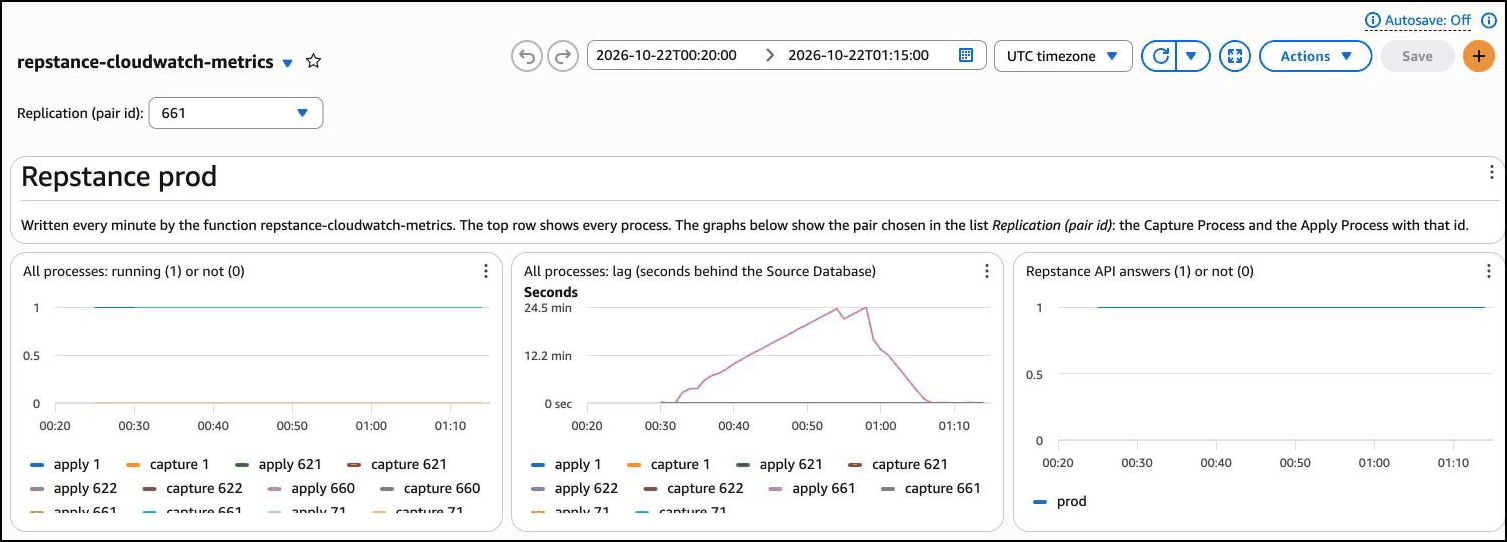
- Running (1) or not (0). A process that has been stopped, has failed or has never run shows 0.
- Lag. The seconds that the process is behind the Source Database. CloudWatch shows long times in minutes. A process that does not run has no lag: its line ends.
- Repstance API answers. 1 while the function gets an answer to the status command, 0 when it does not.
One replication
The list Replication (pair id) at the top of the dashboard chooses a pair: the Capture Process and the Apply Process with that id. The four graphs below it show only that pair.
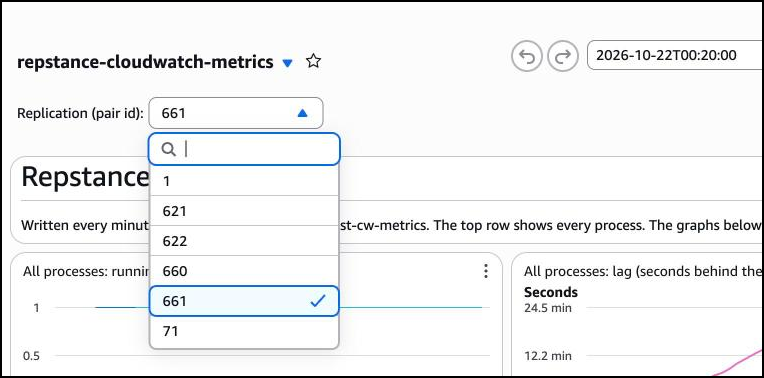
The list works for a pair whose two processes have the same id, as in all the examples of this documentation. If your Capture Process and your Apply Process have different ids, the graphs of an id show only the process with that id. A link to the dashboard can carry the choice: add ?var_pair=661 to its address.
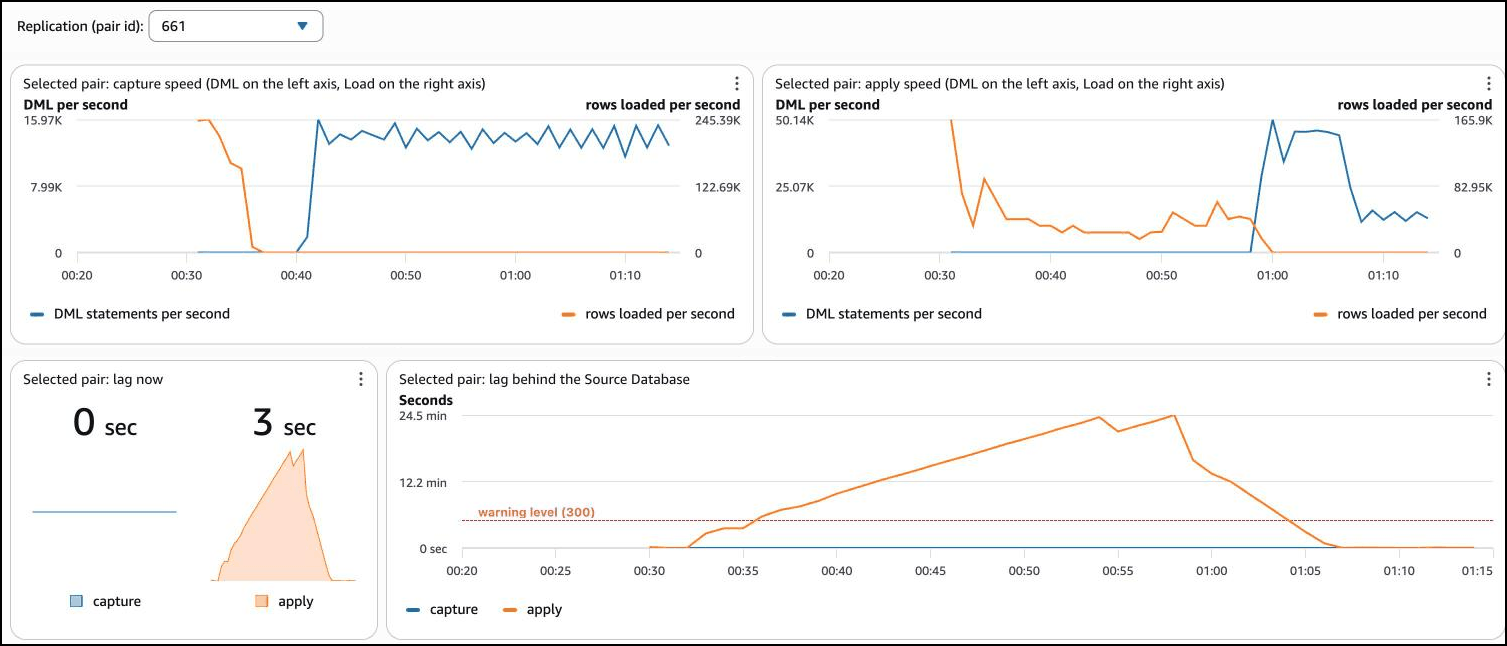
- Capture speed and apply speed. The blue line is the DML statements per second: the inserts, updates and deletes that the process has handled, read on the left axis. The orange line is the rows per second that the process loads during the Initial Load, read on the right axis. The two axes have different scales, because a load moves far more rows a second than a replication moves statements.
- Lag now. The lag of the Capture Process and of the Apply Process at the end of the time range, with a small history line.
- Lag. The lag over time. A dashed red line marks the warning level, 300 seconds unless you changed the parameter LagWarningSeconds.
An example: a replication with an Initial Load
The graphs below are those of a real replication with an Initial Load of the schema SOE (the Swingbench Order Entry example), while a workload changes the Source Database. The times are UTC.
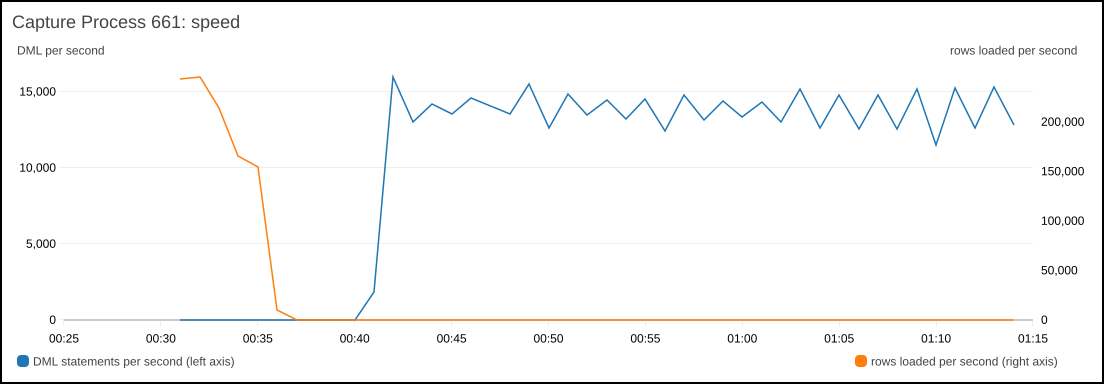
The Capture Process reads the rows first, at up to 245,000 rows a second, and has finished at 00:36. At 00:41 it starts to read the changes of the workload, about 14,000 statements a second.
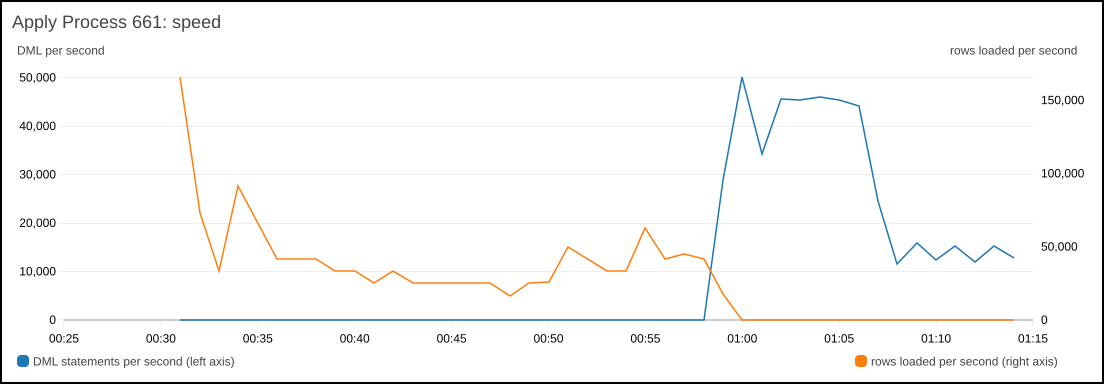
The Apply Process loads more slowly, at 25,000 to 60,000 rows a second for most of the time, and finishes at 00:59. Then it applies the changes that have waited in the trail files, at up to 50,000 statements a second, faster than the Capture Process reads them, and later at the rate of the workload.
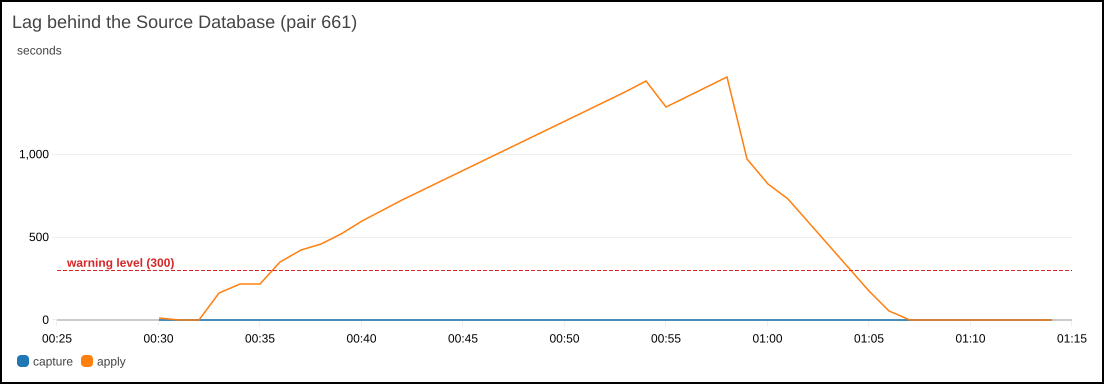
The lag shows the effect. While the Apply Process loads and the Capture Process already reads changes, the lag grows, to 24 minutes at 00:58. After 00:59 the Apply Process works off the backlog, and at 01:07 the lag is closed. The dashed red line is the warning level of 300 seconds. The lag alarm of this replication was on from 00:48 to 01:08 (see CloudWatch Alarms).
The time range, and your own graphs
CloudWatch keeps the values of one minute for 15 days, the values of five minutes for 63 days and the values of one hour for 15 months. Change the time range with the buttons at the top of the dashboard.
The speed graphs use metric math on the counters of the pair. The counters are totals, so the speed is their rate of change: with i, u and d for InsertsTotal, UpdatesTotal and DeletesTotal, the DML statements per second are RATE(i+u+d). The metrics are described in Metrics Reference.
Prev page:
Install the Metrics FunctionNext page:
CloudWatch Alarms- Repstance User Guide
- ABOUT REPSTANCE
- SUPPORTED DATABASE REQUIREMENTS
- GETTING STARTED WITH REPSTANCE
- INTERACTING WITH REPSTANCE SERVER
- CONFIGURE REPLICATION WITH REPSTANCE
- DATABASE CONFIGURATION COMMANDS
- PROCESS CONFIGURATION COMMANDS
- PROCESS CONTROL COMMANDS
- DATA COMPARISON
- REPSTANCE WEB USER INTERFACE
- REPSTANCE SERVER MAINTENANCE
- TROUBLESHOOTING AND FAQ
- GLOSSARY