

Monitoring with Azure Monitor
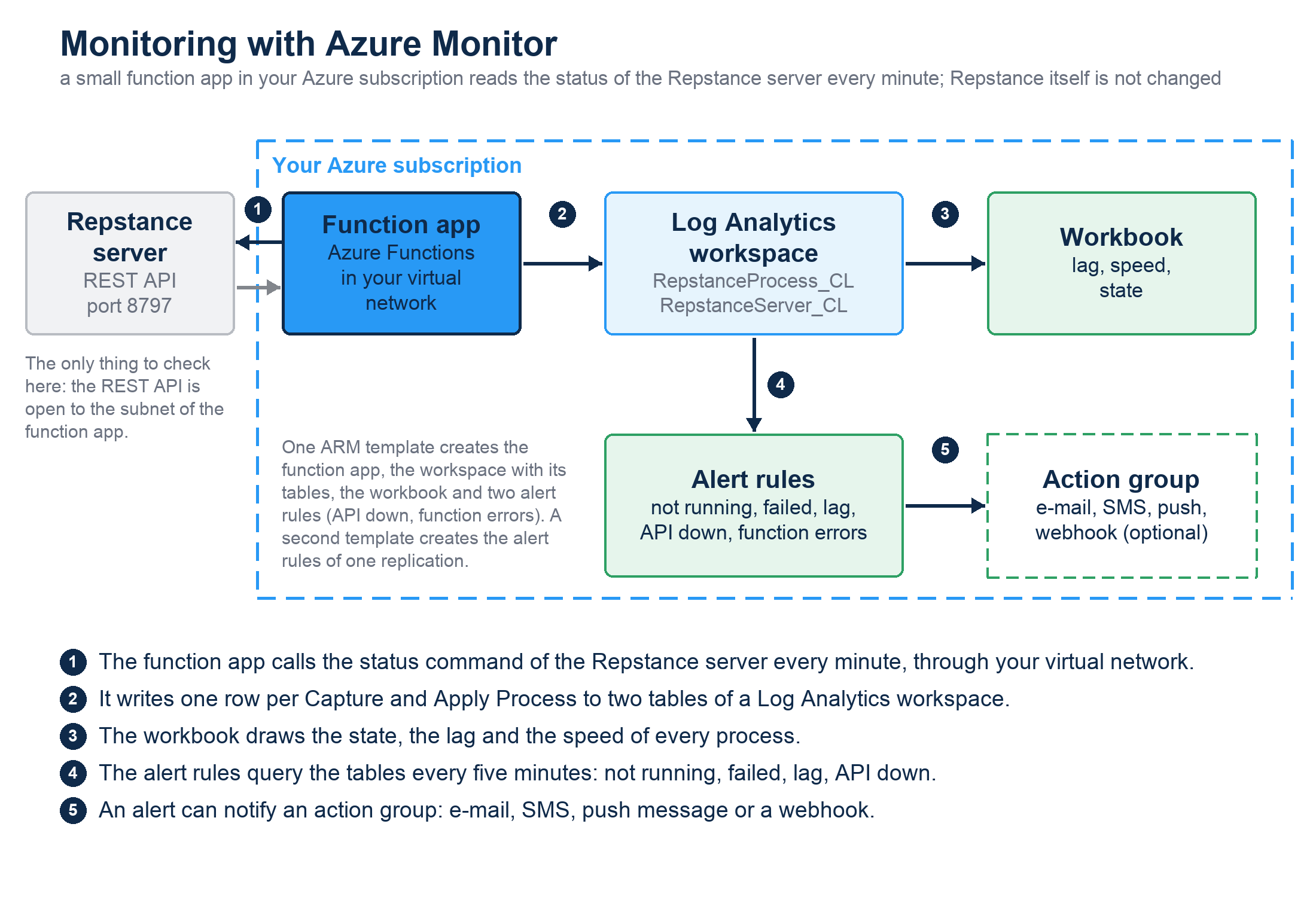
Repstance shows the state of its processes in the Web UI and in repcli, and it can send an e-mail when a process fails (see Monitoring Replication). If Repstance runs on Microsoft Azure, you can also send the state and the speed of every Capture Process and Apply Process to Azure Monitor. There you draw them in a workbook and get an alert when a process stops, fails or falls behind.
Repstance itself is not changed. A small function app in your Azure subscription calls the status command of the REST API every minute and writes one row for every process to a Log Analytics workspace. One ARM template creates the function app, the workspace, a workbook and two alert rules; a second template creates the alert rules of a replication.
What you get
- Rows. Two tables in the workspace: RepstanceProcess_CL has a row for every Capture Process and Apply Process and minute (the state, the lag and the counters of the changes and of the loaded rows), RepstanceServer_CL a row for every server and minute (whether the REST API answers). See Table Reference.
- A workbook. The state of all the processes, and the lag and the speed of one replication, a pair of a Capture Process and an Apply Process (see The Azure Workbook).
- Alerts. A process that is not running or has failed, an Apply Process that is too far behind, a Repstance server that does not answer, and a function that fails (see Azure Monitor Alerts). An alert can notify an action group, which sends an e-mail, a text message, a push message to the Azure app or a voice call, or calls a webhook.
What you need
- An Azure subscription and a resource group for the deployment. The person who deploys needs the role Owner on the resource group (or Contributor and User Access Administrator, because the template gives roles to the identity of the function app), and Network Contributor on the virtual network of the Repstance server, where the template creates a subnet.
- A Repstance server that the function can reach on its private address: a virtual machine in an Azure virtual network of your subscription (for example from the Azure Marketplace image, see Getting Started with Repstance in Microsoft Azure), or a server that can be reached from that network. The region has to support the Flex Consumption plan of Azure Functions; az functionapp list-flexconsumption-locations lists the regions (52 in October 2026).
- The REST API of the server on port 8797. The port is open when the file conf/repstance.conf exists, and the AWS, Azure and on-premises editions create it when the server starts for the first time (see Configure repcli for Remote Access).
- Outbound access to the internet from the subnet of the function app. The template creates the subnet with the default outbound access of Azure; a network that blocks it needs a NAT gateway or a firewall rule for the endpoints that the function writes to (see Security below).
- These resource providers registered in the subscription: Microsoft.App, Microsoft.Web, Microsoft.OperationalInsights and Microsoft.Insights (az provider register --namespace Microsoft.App, and so on). Azure registers a provider when a user with the right to do so creates a resource of its type; the test subscription had them registered before the first deployment, so the automatic way was not tested.
- The Azure CLI 2.x, or the Azure portal.
- The files of the function app: two templates and a zip file, from this site (see Install the Monitoring Function).
What it costs
Azure charges your subscription. The prices below are list prices of the region East US at the time of writing (October 2026); see Azure Monitor pricing and Azure Functions pricing for the current ones. Every process that exists is published, also a process that is stopped.
| Item | Price | One replication (a Capture Process and an Apply Process) |
|---|---|---|
| Alert rules | USD 1.50 per rule and month for a rule that runs every 5 minutes, USD 1.00 every 10 minutes, USD 0.50 every 15 minutes | 5 rules for the replication and 2 for the server: USD 10.50 per month at 5 minutes, USD 3.50 at 15 minutes |
| Function app (Flex Consumption plan) | The first 250,000 executions and 100,000 GB-seconds of every month and subscription are free | The function runs 43,200 times a month for about 0.8 seconds (measured) with 512 MB: about 17,500 GB-seconds, free |
| Log Analytics workspace | The first 5 GB of data a month and account are free, then a price per GB | One server with two processes writes about 340 MB a month (measured: 0.47 MB an hour, most of it the log of the function app), so it stays free |
| Storage account of the function app | a few cents per month | a few cents (not measured) |
| Workbook, managed identity, virtual network integration | no charge | - |
| Notifications | E-mail, push messages and webhook calls cost next to nothing at this volume; text messages and voice calls are charged per message and country | see Azure Monitor pricing |
So one replication costs about USD 10.50 per month at the default frequency of 5 minutes, nearly all of it for the alert rules. Every further replication of the same server adds its 5 rules, USD 7.50 per month. Without the alert rules the monitoring is free for a small installation.
Security
- The function app needs the token of the REST API. It is kept in the application settings of the function app, which Azure encrypts at rest, and everybody who may read the configuration of the function app can read the token. On the Azure edition the token is the id of the virtual machine.
- The function sends only the status command. It has no HTTP trigger, so nothing can call it from outside. It reaches the Repstance server through the virtual network, so keep port 8797 closed to everything else; the rule AllowVnetInBound of a network security group lets the subnet of the function in.
- The function app uses a managed identity. The identity may write to one data collection rule (Monitoring Metrics Publisher), read the workspace (Log Analytics Reader, for the alert rules) and use the storage account of the function app. It has no other rights. The storage account allows no access key and no public access.
- The certificate supplied with Repstance is self-signed, so the function trusts the SHA-256 fingerprint that you give it instead of a certificate chain. To replace it with a certificate of your own, see Configure repcli for Remote Access. After the replacement give the deployment the fingerprint of the new certificate; for a certificate of a trusted certificate authority leave the fingerprint empty and use the name of the certificate in the address (see the parameters on Install the Monitoring Function).
- A network that does not allow outbound traffic needs a rule for *.ingest.monitor.azure.com (where the function writes), for the Blob, Queue and Table endpoints of the storage account of the function app, and for *.applicationinsights.azure.com or *.monitor.azure.com (the log of the function app).
Limits
- One deployment watches one Repstance server. For another server deploy the template again with another namePrefix, or use an existing workspace (the parameter existingWorkspaceName).
- The numbers are as fresh as the last minute plus the time that Azure Monitor needs to make them searchable: a few seconds to several minutes (2 to 6 minutes in the first hours of a new workspace, a few seconds later). An alert needs up to ten minutes to notice a problem (see Azure Monitor Alerts).
- The counters count from the start of the current run of a process, as the numbers of repcli do (see Status of any Capture or Apply Processes).
- A server outside Azure helps only if the function app can reach it through a virtual network, for example over a VPN or ExpressRoute.
In this section
- Install the Monitoring Function: download, deploy, check, update and remove the function app.
- The Azure Workbook: how to read the graphs, with an example of a real replication.
- Azure Monitor Alerts: the alert rules of a replication, and how to be notified.
- Table Reference: the two tables, every column, and queries to start with.
Prev page:
Metrics ReferenceNext page:
Install the Monitoring Function- Repstance User Guide
- ABOUT REPSTANCE
- SUPPORTED DATABASE REQUIREMENTS
- GETTING STARTED WITH REPSTANCE
- INTERACTING WITH REPSTANCE SERVER
- CONFIGURE REPLICATION WITH REPSTANCE
- DATABASE CONFIGURATION COMMANDS
- PROCESS CONFIGURATION COMMANDS
- PROCESS CONTROL COMMANDS
- DATA COMPARISON
- REPSTANCE WEB USER INTERFACE
- REPSTANCE SERVER MAINTENANCE
- MONITORING WITH AMAZON CLOUDWATCH
- TROUBLESHOOTING AND FAQ
- GLOSSARY