

How Data Comparison Works
This page explains what happens between “Run” and the report. It helps you to read the numbers of the report, to choose the settings of a task and to find out why a row is reported. The steps in the Web UI are in Compare Data, the commands are described in the other pages of this section.
The idea
A comparison does not copy data from one database to the other. The Repstance server reads the rows of the Source Database and, later, the rows of the Target Database, turns every row into a hash (a short fingerprint of its values) and compares the two hashes. The rows themselves are not stored: only the keys and the hashes are saved, in a file on the Repstance server.
The parts
Three parts of Repstance take part:
- The compare process. A separate process of the Repstance server that is started when you run a task. It reads the Source Database through its own connection, uses the connection settings and the metadata of the Capture Process, calculates the hashes and keeps its files in the trail folder of the Capture Process. When a readable secondary is configured for a SQL Server Capture Process (the parameter secondary), the chunks are read from the secondary.
- The Capture Process. It captures the note that the compare process makes for every chunk like any other change, so the notes are carried in the stream of the replicated transactions.
- The Apply Process. It meets the note in the stream, reads the same rows from the Target Database, calculates their hashes and compares them with the hashes of the Source Database.
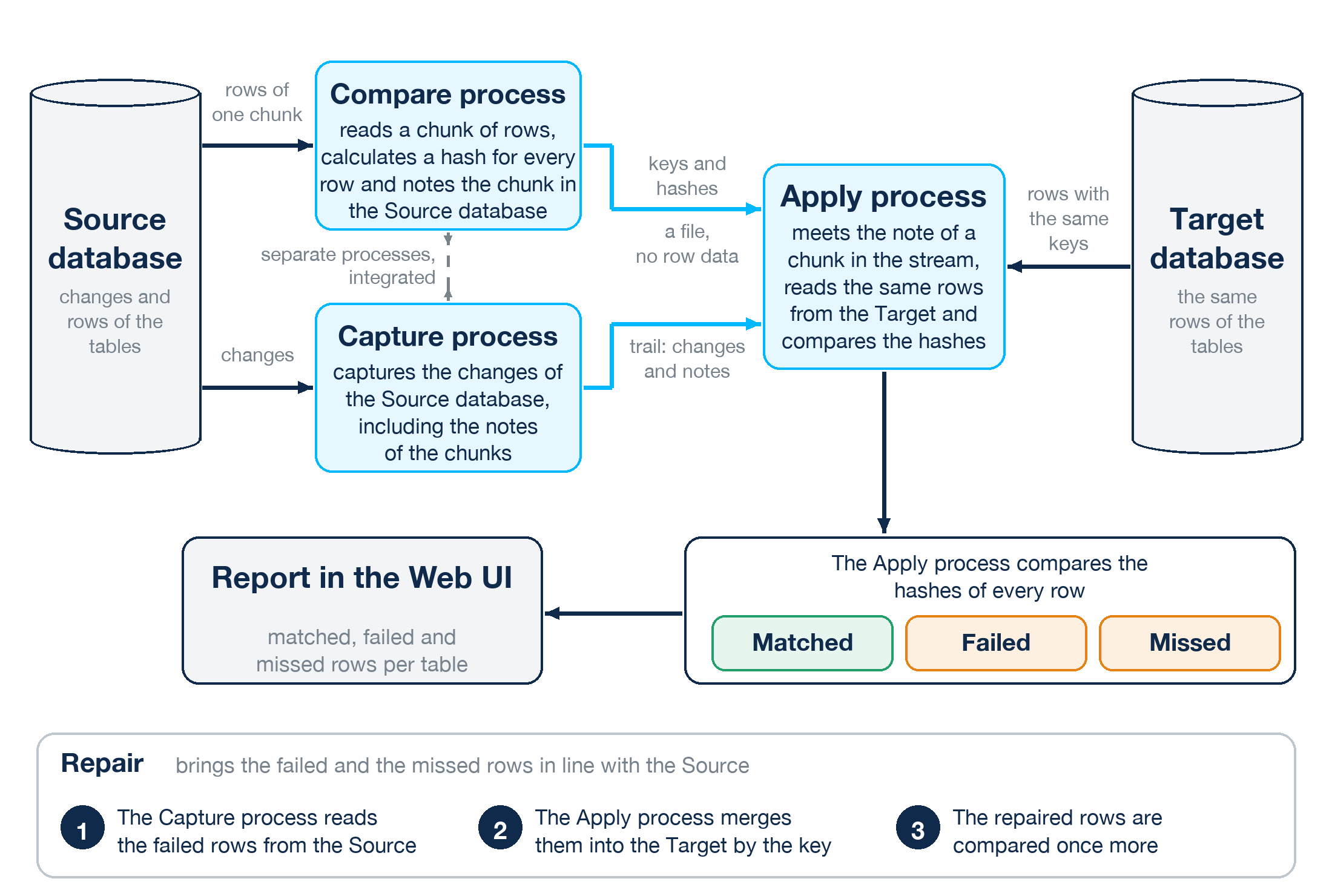
The compare process is a separate process, but it is integrated with the Capture Process. This is why the Capture Process and the Apply Process have to be running while a task runs.
The steps
- You run a task. The compare process takes the tables of the task one after another.
- It reads one chunk of a table: the next rows in the order of the key, starting after the last key of the previous chunk. The position is saved, so a stopped task can continue from it.
- It converts every column that is compared to text in a form that is the same in all databases, joins the texts and calculates the hash of the row (see How the rows are hashed below).
- It saves the keys and the hashes of the chunk in a file in the folder of the task under the trail folder of the Capture Process. The data of the rows stays in the databases.
- It notes the chunk by updating the row of the table in repi.ValidateTables in the Source Database. The update carries the name of the file.
- The Capture Process captures this update like any change, so the note takes its place in the stream of the replicated transactions, behind the changes that were made before it.
- The Apply Process meets the note. It has applied all the changes that came before it, so the comparison does not depend on how far behind the Apply Process was. It loads the keys of the chunk into a temporary table of the Target Database, reads the rows with these keys, calculates their hashes in the same way and compares them with the hashes in the file.
- The result is added to the report of the task: the number of the rows that match, of the rows that differ (failed rows) and of the rows that are missing in the Target Database (missed rows). The keys of the failed and the missed rows are kept for the repair.
- The compare process goes on with the next chunk until the table is complete, and then with the next table.
Chunks and Data Validation %
Rows per Chunk (the parameter chunk) is the number of the rows that are read at a time, 10000 by default. Data Validation % (the parameter deep) is the share of the rows of every chunk that is compared, from 1 to 100, 10 by default.
With less than 100 % the compare process compares the last rows of every chunk in the order of the key. With 10 % and a chunk of 10000 rows these are the 1000 rows with the highest keys, and in a table of 105 rows the last 11 rows (the number is rounded). The other rows of the chunk are not compared. Only 100 % compares every row.
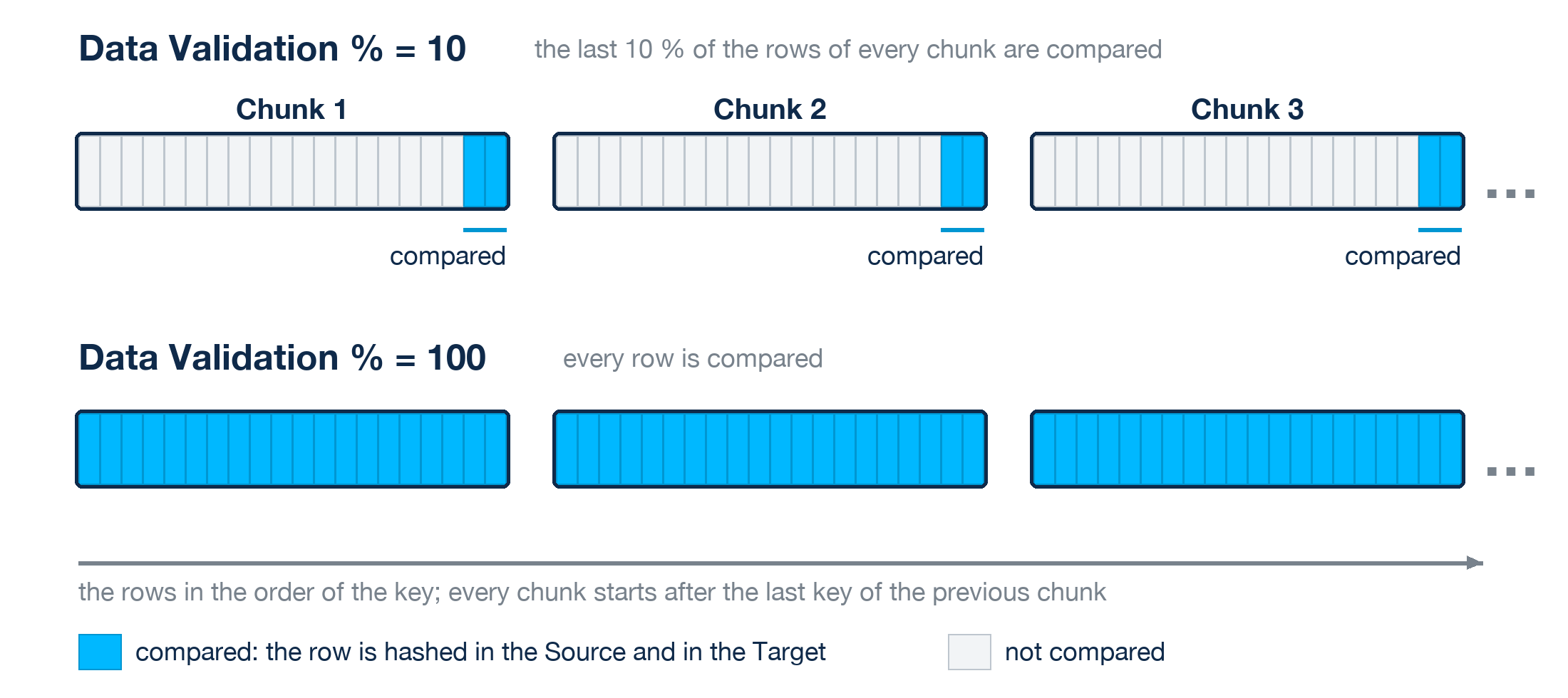
What follows from it:
- A comparison of a part of the rows finds quickly a problem that touches many rows, for example a stopped Apply Process, a transformation rule or a wrong function. It can miss a single row that differs. Use 100 after an initial load and before a switch-over.
- A smaller chunk shows the progress in finer steps and makes smaller files, a bigger chunk needs fewer reads.
- Both values are set for every table, so a task can compare a big table with a smaller share than a small one.
How the rows are hashed
The value of every column that is compared is converted to a text that does not depend on the database. The texts of the columns are joined with a comma and the MD5 hash of the result is the hash of the row. An empty value, NULL or an empty string, is written as N. The same conversion is made in the Source Database and in the Target Database. The conversions of the data types are listed in Requirements and Limits.
The functions of a task (the parameters mapcols and maptypes, “Add f(x)” and Map Types in the Web UI) work on the converted text, not on the original value. They are used in the queries of both databases.
The hash is made of the exact text, so the comparison is case sensitive and accent sensitive whatever the collation of the databases is, and a blank at the beginning of a value matters. A blank at the end of a character value does not.
Incremental and repair
Incremental. The compare process does not read the table. It takes the keys of the rows that have changed since the previous run of the table from the trail files of the Capture Process, reads these rows from the Source Database (all of them, there is no sampling) and goes on as for a chunk. The trail files have to exist, see Start/Stop Task.
Repair. The compare process writes the keys of the failed and the missed rows of the last run into a load configuration. The Capture Process reloads these rows from the Source Database, the Apply Process merges them into the Target Database by the key (a missing row is inserted, a row that differs is updated, no row is deleted) and the compare process compares the keys once more. The steps and the limits are in Start/Stop Task.
Where the files and the tables are
| What | Where |
|---|---|
| The definition of a task: the tables, the settings, the functions | A file in the conf folder of the Repstance server, named after the task and the id of the Capture Process. |
| The state of every table of a task: the status, the chunks that are done, the position, the time of the start | The table repi.ValidateTables in the Source Database. It is replicated to the Target Database like a table of the user. |
| The keys and the hashes of the chunks that the Apply Process has not compared yet | Files in the folder trail/{capture name}/{task name} of the Repstance server. The Apply Process removes a file when it has compared it. |
| The results: the counts, a sample of up to 50 keys of the failed rows and of the missed rows, and the complete list of the keys for the repair | Files with .hashdone in the name in the same folder, a set for every Apply Process. |
Deleting a task removes its rows in repi.ValidateTables, its folder under trail and its file in conf. Do not remove these files by hand.
Several Apply Processes
If several Apply Processes read from the Capture Process, for example for two Target Databases, each of them compares the hashes with its own Target Database. A file of hashes is kept until every one of them has compared it, and the report shows the result for each Apply Process.
The compare process does not wait
The compare process does not wait for the Apply Process. It reads chunk after chunk, and the number of the chunks that it has read (the column Capture of the report) runs ahead of the number that the Apply Process has compared (the column Apply). The files of the chunks wait in the trail folder until the Apply Process has compared them, so a stopped or a slow Apply Process lets them pile up. Watch the disk space of the server when you compare a big table with Data Validation % 100, and start the Apply Process before the task.
Prev page:
DATA COMPARISONNext page:
Requirements and Limits- Repstance User Guide
- ABOUT REPSTANCE
- SUPPORTED DATABASE REQUIREMENTS
- GETTING STARTED WITH REPSTANCE
- INTERACTING WITH REPSTANCE SERVER
- CONFIGURE REPLICATION WITH REPSTANCE
- DATABASE CONFIGURATION COMMANDS
- PROCESS CONFIGURATION COMMANDS
- PROCESS CONTROL COMMANDS
- REPSTANCE WEB USER INTERFACE
- REPSTANCE SERVER MAINTENANCE
- GLOSSARY